
Best Budget Keyboards 2026
A category-specific approach to ranking Budget Keyboards
Most general product roundups are built around broad buyer priorities. Flickthru evaluates budget keyboards for home-office workers, prioritising typing comfort and feel, reliability and daily operation, value for money, layout and productivity features, and build quality and durability.

Keychron B6 Pro
A full-size, ultra-slim wireless keyboard with bouncy scissor-switch keys, triple-mode connectivity, and a claimed 1,200 hours of battery life — Keychron’s pitch for buyers who want a mechanical-adjacent typing feel and a numpad without paying mechanical-keyboard prices.
- Springy scissor switches feel closer to a mechanical board than typical budget membrane keys
- Claimed 1,200-hour battery life, among the longest in this list
- Full-size layout with numpad and RGB backlighting at a budget price
- Physical switch toggles connections rather than dedicated one-touch device keys like Logitech’s Easy-Switch
- Plastic ABS body and non-hot-swappable design versus Keychron’s pricier custom boards
B6 Pro tops this budget list because it packs full-size layout, RGB, and genuinely long battery life into a price point most full-size wireless keyboards don’t match — reviewers specifically note its scissor switches feel punchier than typical budget membrane boards, closer to the MX Keys S than its price suggests.
The scissor switches are noticeably springier than typical budget membrane keys, giving a satisfying, punchy feel closer to a low-profile mechanical board than most keyboards at this price. A physical switch toggles between Bluetooth, 2.4GHz, and wired connections rather than dedicated one-touch device keys, a slightly clumsier setup than Logitech’s Easy-Switch but still functional across three devices.
- Buyers who place the highest priority on build quality and durability
- Buyers who place the highest priority on ergonomics and desk fit
| Form Factor | full-size low-profile wireless scissor |
|---|---|
| Office Use Basis | Complete general-purpose keyboard suitable for office productivity |
Logitech Signature K650
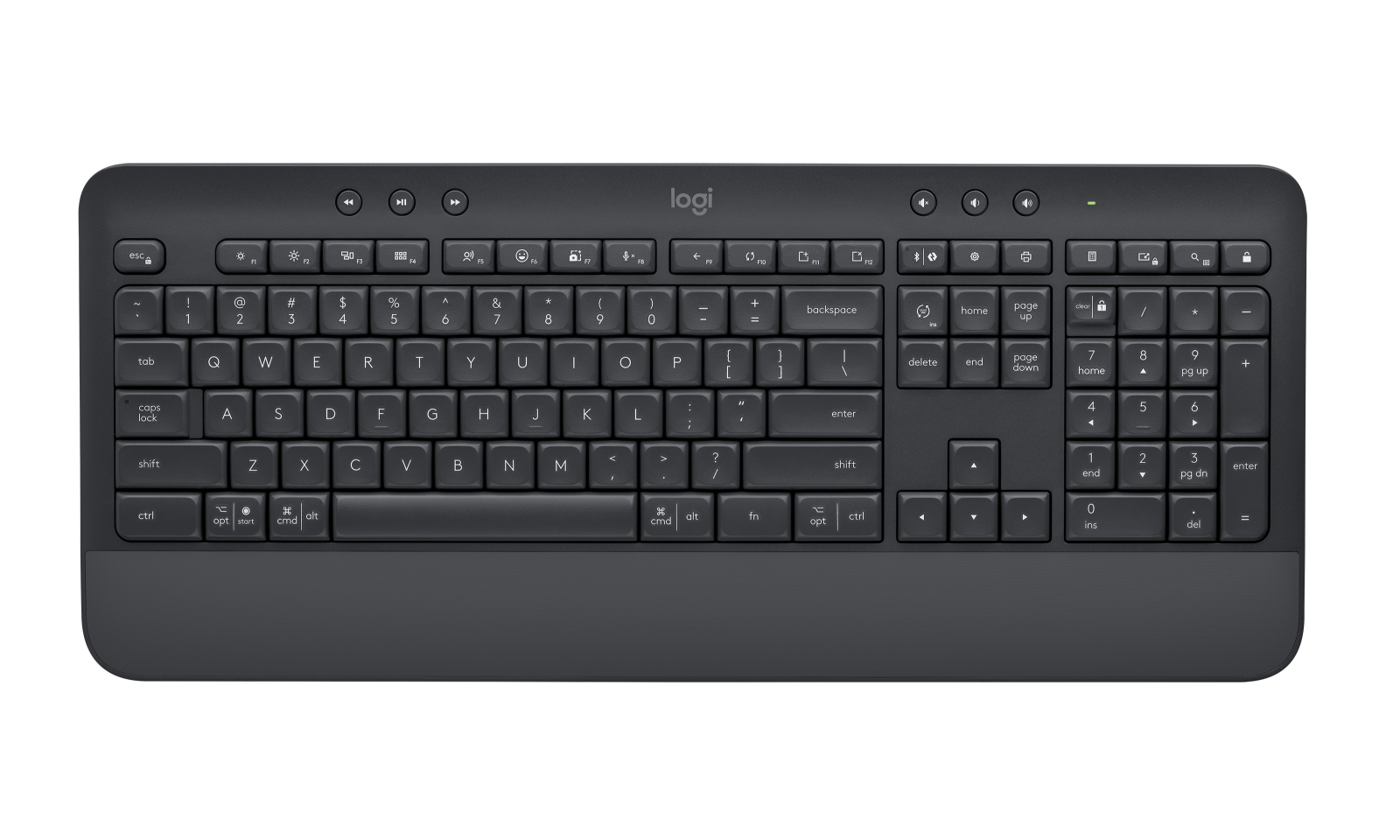
An affordable full-size wireless keyboard with a built-in wrist rest and deep-cushioned keys, aimed at buyers who want Logitech’s typing comfort and reliability without paying for multi-device Easy-Switch or backlighting.
- Deep-cushioned, smooth keys feel comfortable well beyond what the price suggests
- Offers both Bluetooth and 2.4GHz (Logi Bolt) wireless connectivity, more flexible than Bluetooth-only rivals
- Full-size layout with numpad at close to half the price of Logitech’s own Signature Slim K950
- No multi-device Easy-Switch — reconnecting to a different device is a manual process
- Built-in wrist rest offers minimal real support for long sessions
K650 ranks here as the clear value pick: it delivers nearly everything pricier Logitech keyboards offer — comfortable cushioned keys, a numpad, dual Bluetooth/2.4GHz connectivity — at roughly half the price of the Signature Slim K950, only losing multi-device Easy-Switch in the trade.
The deep-cushioned, slightly concave keys are genuinely comfortable for extended typing despite the low price, and reviewers have specifically praised the smooth, bouncy feel as punching above its cost. It lacks Easy-Switch multi-device pairing and backlighting, and the built-in wrist rest offers only minimal support, but everyday connectivity and reliability are solid.
- Buyers who place the highest priority on ergonomics and desk fit
- Buyers who place the highest priority on build quality and durability
| Form Factor | full-size wireless membrane |
|---|---|
| Office Use Basis | Complete general-purpose keyboard suitable for office productivity |
Logitech Wave Keys
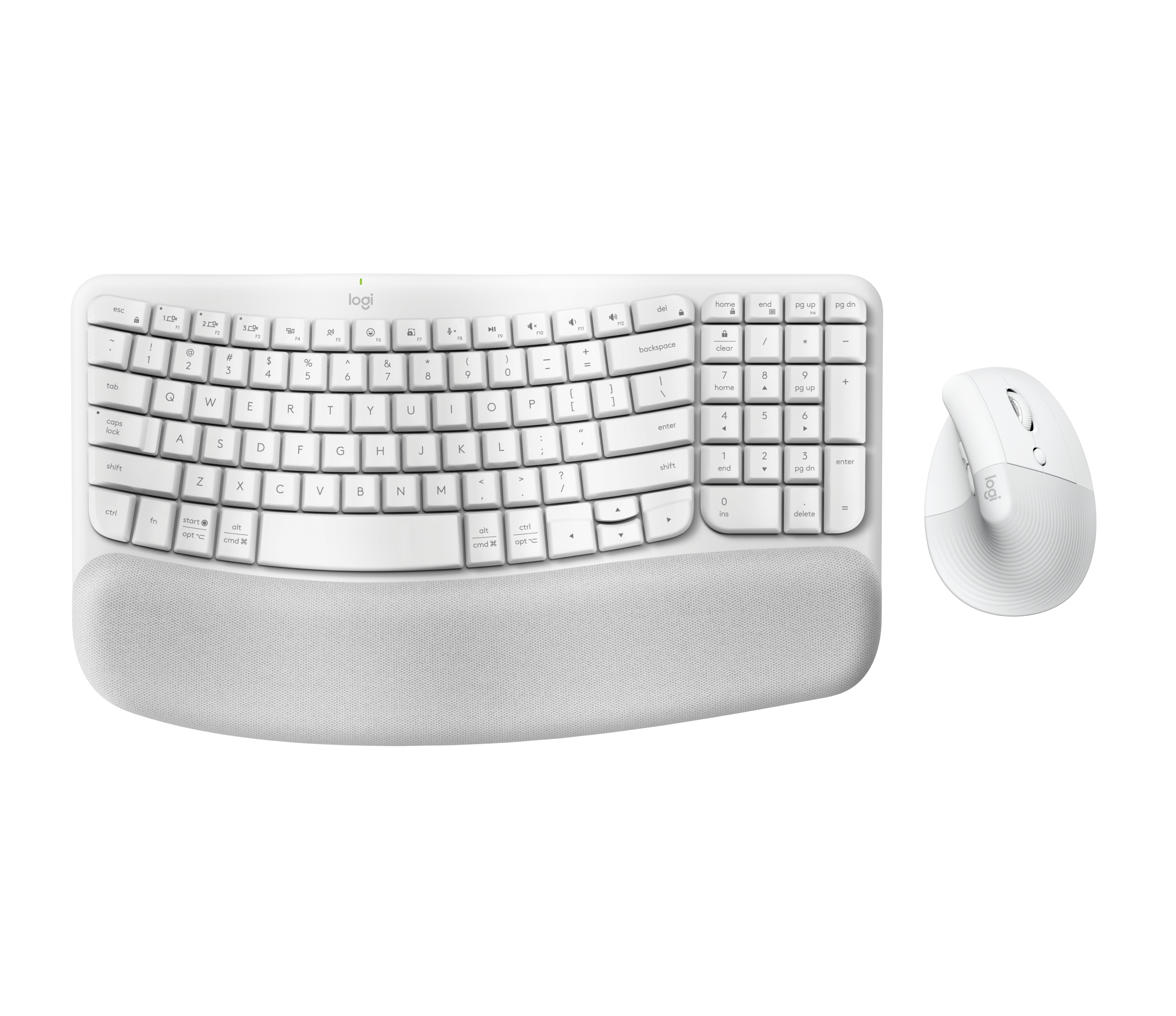
A wave-shaped ergonomic keyboard with a built-in cushioned palm rest, certified by United States Ergonomics, positioned here as an affordable way to get a genuine ergonomic typing position without the price or relearning curve of a fully split keyboard.
- Certified ergonomic design (United States Ergonomics) with a three-layer memory foam palm rest
- Easy-Switch multi-device pairing, a feature the cheaper K650 lacks
- No relearning period required, unlike a fully split ergonomic keyboard
- Costs more than Logitech’s plainer Signature K650 and Slim K950 for buyers who don’t need the ergonomic shape
- Scissor-switch keys offer no mechanical-switch feedback
Wave Keys earns a mid-table spot in this budget list because it’s the only board here designed around measurable ergonomic benefit rather than just typing feel or price, but its cost sits above the plainer Signature K650 and Slim K950, which is why it doesn’t rank higher on pure value.
The wave-shaped key layout and three-layer memory foam palm rest are designed to reduce wrist and forearm strain versus a flat keyboard, without requiring the relearning period a fully split board demands. Easy-Switch and Logi Options+ connect up to three devices via Bluetooth or the bundled Logi Bolt receiver.
- Buyers who place the highest priority on build quality and durability
- Buyers who place the highest priority on value for money
| Form Factor | full-size compact ergonomic wireless membrane |
|---|---|
| Office Use Basis | Complete general-purpose keyboard suitable for office productivity |
Logitech Signature Slim K950
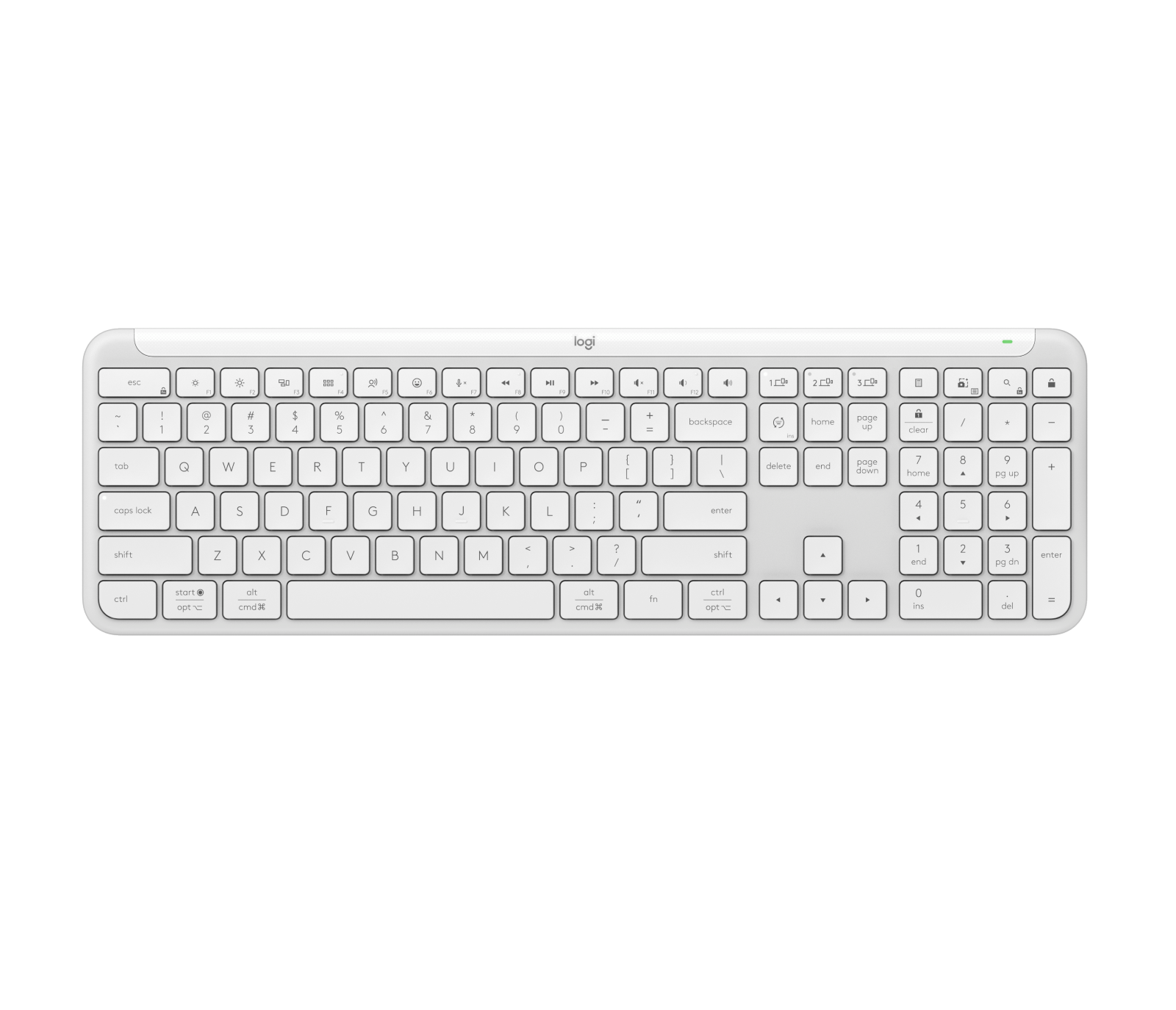
A slim, low-profile wireless keyboard built for multi-device productivity, with Easy-Switch pairing across up to three devices and quiet, stable keys tuned to minimize noise while maximizing responsiveness.
- Easy-Switch pairs with up to three devices, a real upgrade over the cheaper K650
- Slim, low-profile design is more travel-friendly than full-size wrist-rest boards
- Quiet, stable keys tuned specifically to minimize noise without sacrificing responsiveness
- Costs meaningfully more than the K650 for buyers who don’t need multi-device switching
- No backlighting or mechanical-switch feedback
Slim K950 ranks above the cheaper K650 specifically because it adds Easy-Switch multi-device pairing and a slimmer, more travel-friendly profile — reviewers have called out the K650 as the better buy only if you don’t need that device-switching, which is exactly the trade-off this ranking reflects.
The stable, enhanced keys are tuned specifically to reduce noise while maintaining responsiveness, making it a genuinely quieter typing experience than the K650’s deeper, springier keys. Easy-Switch pairs with up to three devices via Bluetooth 5.1, and Logi Options+ adds assignable F-keys and Smart Actions shortcuts.
- Buyers who place the highest priority on ergonomics and desk fit
- Buyers who place the highest priority on build quality and durability
| Form Factor | full-size low-profile multi-device wireless scissor |
|---|---|
| Office Use Basis | Complete general-purpose keyboard suitable for office productivity |

Cherry Stream Keyboard
A wired, whisper-quiet keyboard built around Cherry’s own SX scissor switches, designed for a distinct typing feel at a low price without wireless connectivity or extra software to configure.
- Cherry’s own SX scissor switches deliver a distinct, whisper-quiet typing feel praised by reviewers
- Simple USB-A wired connection needs no pairing, batteries, or software setup
- Genuinely low price for switches engineered by a name-brand switch manufacturer
- Wired only — no wireless or multi-device switching, unlike every Logitech board in this list
- No numpad or backlighting
Stream Keyboard ranks here as the pick for buyers who specifically want Cherry’s own switch engineering and near-silent typing over wireless convenience — TechRadar’s own review calls it a standout for typing feel among affordable boards, but the lack of wireless keeps it behind the Logitech options above it in a general budget ranking.
Cherry’s SX scissor switches are engineered specifically for a quiet, distinct typing feel, and reviewers have praised the comfort and performance as elevating it above typical budget boards despite its plain feature set. It’s wired-only via USB-A, so there’s no Bluetooth pairing or multi-device switching to configure.
- Buyers who place the highest priority on ergonomics and desk fit
- Buyers who place the highest priority on build quality and durability
| Form Factor | full-size wired scissor |
|---|---|
| Office Use Basis | Complete general-purpose keyboard suitable for office productivity |

AULA F99
A 96%-layout hot-swappable mechanical keyboard with a gasket-mounted PCB, triple-mode connectivity, and an 8000mAh battery, aimed at buyers who want real mechanical-keyboard features — hot-swap switches, a numpad, RGB — at a price far below Keychron or Logitech’s mechanical lines.
- Hot-swappable switches and a gasket mount, features rarely found this cheap
- 8000mAh battery gives significantly longer runtime than most budget wireless keyboards
- 96% layout keeps a numpad in a more compact footprint than full-size boards
- AULA Driver software is less polished and less widely supported than Keychron’s or Logitech’s
- Plastic case build quality doesn’t match established brands at a similar price
F99 ranks here because it undercuts every other mechanical option in this list on price while still offering hot-swappable switches and a gasket mount, features usually reserved for pricier boards — the trade-off, reflected in its rank, is software and build-quality polish that doesn’t match established brands.
The multi-layer gasket mount isolates the plate and PCB from the case, meaningfully reducing vibration and noise for a cushioned, precise typing feel that’s rare at this price. The massive 8000mAh battery and triple-mode connectivity (2.4GHz, Bluetooth 5.1, wired) give it genuinely long runtime, though AULA’s own driver software is less refined than Keychron’s or Logitech’s.
- Buyers who place the highest priority on ergonomics and desk fit
- Buyers who place the highest priority on noise and shared space suitability
| Form Factor | 96-percent tri-mode mechanical |
|---|---|
| Office Use Basis | Complete general-purpose keyboard suitable for office productivity |

Logitech K780 Multi-Device
A full-size wireless keyboard built specifically to type across a computer, phone, and tablet, with an integrated cradle to hold a mobile device upright and Easy-Switch buttons to jump between all three.
- Integrated device cradle holds a phone or tablet upright for typing directly on the keyboard
- Up to 24 months of battery life, among the longest in this list
- Easy-Switch buttons pair with three devices across Windows, Mac, Android, iOS, and ChromeOS
- Design and key feel haven’t been meaningfully updated in years compared to newer Logitech boards
- No backlighting, RGB, or programmable shortcut keys
K780 ranks here for a specific use case none of the other boards address as directly: typing across a phone or tablet as often as a computer. Its integrated device cradle and 24-month battery life are genuinely useful for that workflow, but its dated design and lack of backlighting keep it behind the more modern Logitech boards above it.
The built-in rubber cradle holds a phone or tablet at a usable angle right on the keyboard, and Easy-Switch buttons let you jump between three paired devices instantly — a workflow no other keyboard in this list replicates as directly. Quiet PerfectStroke keys and up to 24 months of battery life round out a design aimed squarely at everyday reliability over features.
- Buyers who place the highest priority on ergonomics and desk fit
- Buyers who place the highest priority on typing comfort and feel
| Form Factor | full-size multi-device wireless membrane |
|---|---|
| Office Use Basis | Complete general-purpose keyboard suitable for office productivity |

Keychron C3 Pro
A wired, tenkeyless mechanical keyboard with hot-swappable switches, QMK programmability, and internal foam and gasket-mount dampening — reviewers have specifically called it the budget mechanical board to beat for combining real customization with a sub-$40 price.
- Hot-swappable switches and full QMK remapping, rare at this price point
- Internal foam and gasket mount give a more cushioned feel than typical budget mechanical boards
- PCWorld and Reviewed both specifically named it standout value in their reviews
- Wired only, no wireless connectivity
- Full plastic body and ABS keycaps versus the aluminum construction of pricier Keychron boards
C3 Pro ranks here because it delivers genuine hot-swap and QMK customization — features usually reserved for $100+ boards — at a price PCWorld and Reviewed both singled out as exceptional value, though it drops behind wireless options above it since it’s wired-only.
Internal foam and a gasket mount give the C3 Pro a more cushioned, less hollow-sounding keystroke than typical budget mechanical boards, and PCWorld specifically praised it as “the new budget board to beat.” Hot-swap sockets accept nearly any 3-pin or 5-pin MX-style switch, and QMK support allows full remapping through Keychron’s Launcher web app.
- Buyers who place the highest priority on noise and shared space suitability
- Buyers who place the highest priority on layout and productivity features
| Form Factor | tenkeyless wired mechanical |
|---|---|
| Office Use Basis | Complete general-purpose keyboard suitable for office productivity |

Keychron B1 Pro
The compact 75% sibling to the B6 Pro: the same ultra-slim wireless design and triple-mode connectivity in a smaller footprint that drops the numpad, aimed at buyers prioritizing desk space and portability over a full-size layout.
- Compact 75% layout is more portable and desk-space-friendly than the full-size B6 Pro
- Same triple-mode connectivity and claimed long battery life as its full-size sibling
- ZMK/QMK customization support via Keychron Launcher
- Drops the numpad the B6 Pro offers, a real trade-off for spreadsheet-heavy work
- Some owners have reported key-reliability issues developing after extended use
B1 Pro ranks below its full-size sibling mainly because most budget buyers value the numpad the B6 Pro offers, but it’s the better pick specifically for anyone prioritizing portability — its lighter, smaller frame and identical triple-mode connectivity make it the travel-friendly option in this list.
The B1 Pro shares its sibling’s scissor-switch feel and triple-mode connectivity (2.4GHz, Bluetooth, wired) in a lighter, more compact 75% frame, with a claimed battery life similarly rated up to 1,200 hours. Some owners have reported reliability issues after extended use, including stuck-key glitches, worth weighing against its portability advantage.
- Buyers who place the highest priority on layout and productivity features
- Buyers who place the highest priority on build quality and durability
| Form Factor | compact low-profile wireless scissor |
|---|---|
| Office Use Basis | Complete general-purpose keyboard suitable for office productivity |

Dell KB216 Multimedia Keyboard
A basic wired full-size keyboard with quiet membrane keys and spill-resistant design — the same style of keyboard bundled with countless office desktops, included here as the no-frills, lowest-cost baseline in this comparison.
- Lowest price in this list by a clear margin
- Simple USB wired connection works instantly with zero setup, pairing, or batteries
- Spill-resistant design suited to everyday office use
- No wireless connectivity, backlighting, or programmable keys of any kind
- Basic membrane keys offer none of the tactile feedback or comfort features found elsewhere in this list
KB216 ranks last in this list because it’s a genuinely no-frills keyboard: no wireless, no backlighting, no programmable keys, and no special switch engineering. It earns its place purely on rock-bottom price and the simplicity of a plug-and-type USB connection with zero setup.
As a basic membrane keyboard, the KB216 doesn’t compete on typing feel or features with anything else in this list — its value is in doing exactly one thing (basic typing) reliably, over a simple wired USB connection with no drivers, pairing, or batteries required.
- Buyers who place the highest priority on build quality and durability
- Buyers who place the highest priority on ergonomics and desk fit
| Form Factor | full-size wired low-profile membrane |
|---|---|
| Office Use Basis | Complete general-purpose keyboard suitable for office productivity |
How We Evaluate Budget Keyboards
Our rankings are built through the Flickthru CORE™ Market Research Engine, which first analyses the category, its intended buyers, and the current US market. Products are then assessed using category-specific evidence, performance indicators, availability, ownership signals, and long-term reliability considerations.
Recommendations reflect overall suitability for the intended buyer – not simply the highest specification, lowest price, or strongest result in a single test. When product-level customer feedback is limited, we prioritize official validation, credible technical evidence, and demonstrated category suitability rather than estimating or inflating review counts. Read the full Flickthru product ranking methodology.
- Category Specific Analysis: Defining buyers’ needs, primary uses, business priorities, acceptable compromises, and category-specific requirements before products are compared.
- Long-Term Reliability: Tracking recurring failure patterns, component durability, warranty trends, and long-term ownership outcomes from verified market data.
- Performance: Evaluating category-specific real-world performance, efficiency, consistency, and practical usability rather than relying on marketing claims alone.
- Features: Assessing functionality, usability, build quality, safety, ergonomics, and category-specific capabilities important to long-term ownership.
- Value: Measuring total cost of ownership, lifecycle longevity, support quality, lifecycle suitability, and overall return on investment.
- Evidence Review: Combining verified purchaser feedback where available with professional testing, official product validation, technical evidence, and market suitability signals.
- Market Coverage: Mapping the current US market, credible product families, availability, price positioning, and relevant competitors within the category.
Products demonstrating recurring reliability concerns, inconsistent performance behavior, poor ownership outcomes, or widespread negative sentiment are algorithmically suppressed from our rankings regardless of marketing claims, sponsorship relationships, or short-term popularity trends.
This methodology is designed to identify products that deliver genuine long-term value, reliability, and real-world usefulness rather than simply matching short-term hype, advertising claims, or isolated test results.