
Best Curved Monitors 2026
A category-specific approach to ranking Curved Monitors
Most general product roundups are built around broad buyer priorities. Flickthru evaluates curved monitors for professionals and businesses seeking a more natural single-screen multi-window workspace, prioritising curvature and spatial fit, display quality, connectivity and docking, ergonomics and comfort, and mixed use performance.
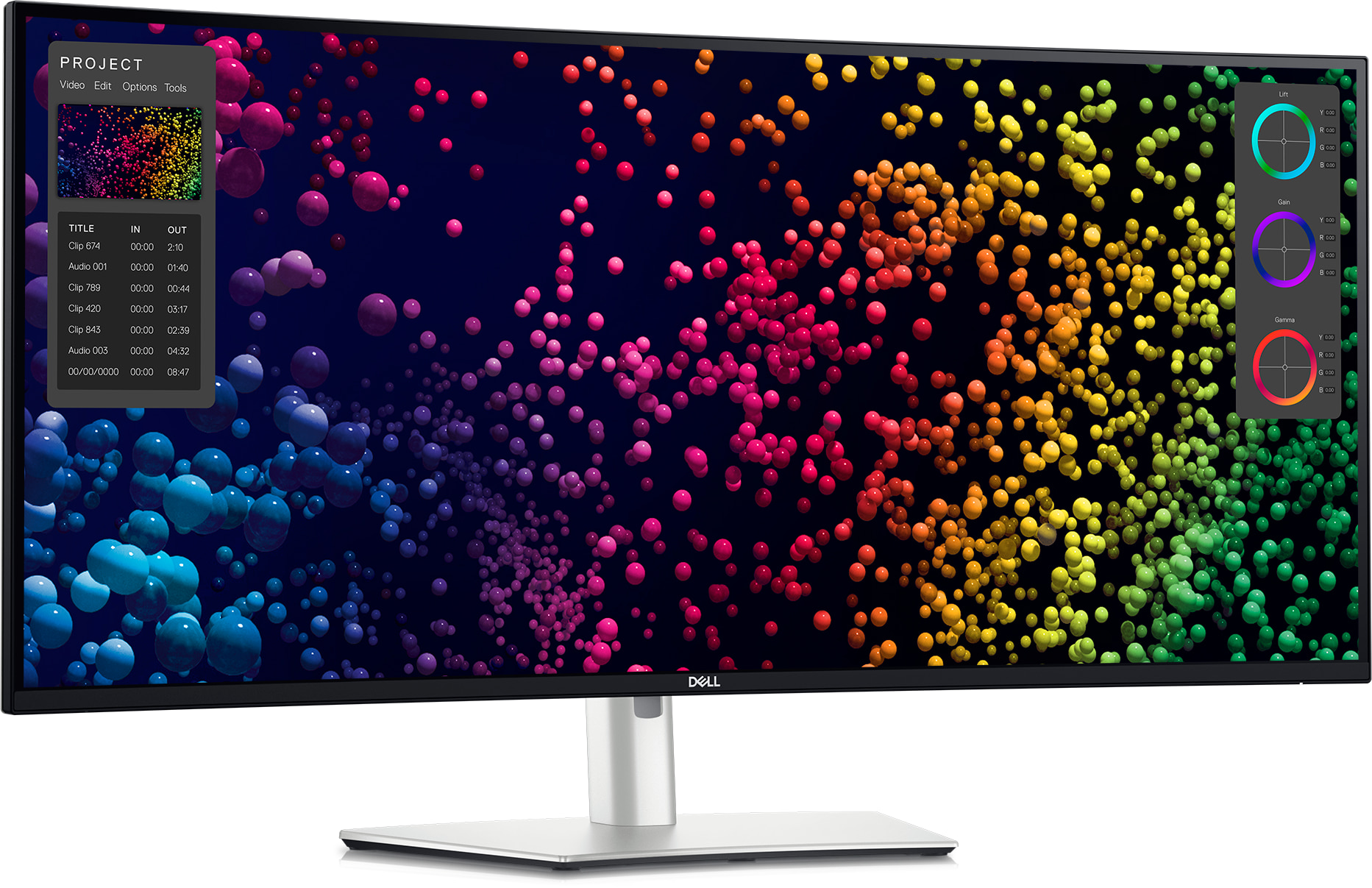
Dell UltraSharp 40 Curved Thunderbolt Hub Monitor U4025QW
Exceptionally sharp 5K2K workspace, but very expensive keeps it from being universal.
- Exceptionally sharp 5K2K workspace
- 120 Hz makes desktop movement smoother
- Class-leading Thunderbolt 4 hub with 140 W charging
- Strong factory color and IPS Black contrast
- Very expensive
- Large and heavy for shallow desks
- Motion clarity trails fast gaming panels
- Professionals wanting one premium display for sharp text, multitasking and laptop docking
- Budget buyers or competitive gamers who prioritize motion clarity and HDR impact
U4025QW takes the top spot because lab testing found superb text clarity and strong office utility from its 5K2K curve paired with Thunderbolt 4 — the strongest all-round result in this list, beating the even-larger U5226KW right behind it mainly on value and desk practicality rather than raw resolution.
Laboratory review found superb text clarity and strong office utility, while motion remains blurry and HDR local dimming is weak.
A current Dell support route is available. Public evidence does not establish a population-level long-term failure rate for this exact model.
| Screen Size | 39.7-inch |
|---|---|
| Aspect Ratio | 21:9 |
| Native Resolution | 5120 x 2160 |
| Maximum Refresh Rate | 120 Hz |
| Panel Technology | IPS Black |
| Connectivity Summary | Thunderbolt 4 hub, 140W charging, Ethernet and KVM |
| Specification Scope | exact model |

Dell UltraSharp 52 Thunderbolt Hub Monitor U5226KW
Enormous 6K2K workspace can replace several displays, but extremely expensive keeps it from being universal.
- Enormous 6K2K workspace can replace several displays
- 120 Hz desktop motion
- Excellent multi-input, KVM and Thunderbolt hub
- Strong IPS Black color and contrast for office work
- Extremely expensive
- Requires a very large desk
- Native scaling needs careful setup, especially on macOS
- Analysts, traders and creators who genuinely need a single 52-inch command center
- Small desks, simple single-app work or buyers seeking ordinary plug-and-play scaling
U5226KW ranks second on the strength of its enormous 6K2K curved workspace, genuinely able to replace several displays at once — it loses the top spot mainly on price and desk footprint, plus the extra setup care native scaling needs, especially on macOS.
Its 6K2K curved resolution delivers an enormous 52-inch workspace genuinely capable of replacing several separate displays, backed by 120Hz motion, a strong Thunderbolt hub with KVM switching, and IPS Black contrast for office work — though native scaling needs careful setup, particularly on macOS.
A current Dell support route is available. Public evidence does not establish a population-level long-term failure rate for this exact model.
| Screen Size | 51.5-inch |
|---|---|
| Aspect Ratio | 24:10 |
| Native Resolution | 6144 x 2560 |
| Maximum Refresh Rate | 120 Hz |
| Panel Technology | IPS Black |
| Connectivity Summary | Thunderbolt 4 hub with 140W charging, KVM and multi-input modes |
| Specification Scope | exact model |

ASUS ROG Swift OLED PG34WCDN
The PG34WCDN combines exceptional 360 Hz motion, improved OLED text rendering, strong HDR and 90W USB-C docking in a practical 1800R ultrawide format.
- Exceptional 360 Hz OLED motion
- RGB-stripe panel improves text clarity
- Bright HDR and excellent color accuracy
- 90W USB-C, KVM and modern high-bandwidth ports
- Premium $1,299 price
- OLED static-content risk remains
- Bright-room blacks still rise
- Enthusiasts who want one premium 34-inch curved display for gaming, creative work and laptop-connected productivity
- Budget offices, static-content deployments or buyers needing 4K/5K2K workspace resolution
PG34WCDN ranks third as the strongest gaming-first curved monitor in this list: exceptional 360Hz motion and factory color accuracy in a practical 1800R curve give it a genuine edge over the productivity-focused Dell monitors above it for buyers who also game, though those Dell monitors still lead on sharper resolution and dock completeness.
Exceptional sharpness, brightness, motion and factory accuracy, with a practical 1800R curve for work and play.
A current ASUS support route is available. Public evidence does not establish a population-level long-term failure rate for this exact model, and the same OLED burn-in considerations that apply to other OLED panels in this list are worth weighing for static desktop use.
| Screen Size | 34-inch |
|---|---|
| Aspect Ratio | 21:9 |
| Native Resolution | 3440 x 1440 |
| Maximum Refresh Rate | 360 Hz |
| Panel Technology | Tandem RGB QD-OLED |
| Connectivity Summary | DisplayPort 2.1a, HDMI 2.1 and USB-C with 90W charging |
| Specification Scope | exact model |
| Curvature | 1800R |

LG UltraWide 40WP95C-W
Sharp 5K2K canvas, but only 72 hz keeps it from being universal.
- Sharp 5K2K canvas
- Strong color coverage for creative work
- Thunderbolt 4 with 96 W charging and daisy chaining
- Mature model with several independent reviews
- Only 72 Hz
- Limited brightness and HDR impact
- Slow pixel response
- Creators and office users who value resolution and proven Thunderbolt connectivity over speed
- Gaming-heavy users or buyers who want strong HDR and high refresh rates
UltraWide 40WP95C-W ranks fourth as a mature, well-reviewed 5K2K curved alternative to the pricier Dell monitors above it, with strong color coverage for creative work — it falls behind them mainly because its 72Hz refresh rate and slower pixel response trail the faster panels ranked higher in this list.
Laboratory review found it very good for office and creative use with excellent connectivity, but slow motion, low contrast and limited brightness.
A current LG support route is available. Public evidence does not establish a population-level long-term failure rate for this exact model.
| Screen Size | 39.7-inch |
|---|---|
| Aspect Ratio | 21:9 |
| Native Resolution | 5120 x 2160 |
| Maximum Refresh Rate | 72 Hz |
| Panel Technology | Nano IPS |
| Connectivity Summary | Thunderbolt 4 with 96W charging and daisy chaining |
| Specification Scope | exact model |

Dell Alienware Alienware 32 4K QD-OLED Gaming Monitor AW3225QF
The AW3225QF combines outstanding 4K sharpness, OLED contrast and 240 Hz responsiveness at a strong current price, but it is not a productivity dock.
- Exceptional 4K QD-OLED image quality
- 240 Hz motion and very low input lag
- Excellent text and creative-work sharpness
- Three-year Dell coverage includes OLED burn-in
- No full USB-C laptop dock or Ethernet
- Glossy surface and black lift in bright rooms
- Static office content carries OLED burn-in risk
- Premium mixed-use buyers combining 4K work, creative applications, PC gaming and console gaming
- All-day static office deployments, bright uncontrolled rooms or one-cable business-laptop docking
AW3225QF ranks fifth for buyers who specifically want gaming performance in a curved 4K panel: outstanding 240Hz responsiveness and OLED contrast are genuine strengths, but it isn’t a productivity dock the way the higher-ranked Dell UltraSharp monitors are, which is exactly why it sits below them in this office-leaning list.
Outstanding gaming response, 4K text clarity and dark-room image quality; OLED burn-in and reflections limit static office use.
A current Dell/Alienware support route is available. Public evidence does not establish a population-level long-term failure rate for this exact model, and OLED-specific concerns like burn-in risk are a genuine long-term ownership consideration for static office use.
| Screen Size | 31.6-inch |
|---|---|
| Aspect Ratio | 16:9 |
| Native Resolution | 3840 x 2160 |
| Maximum Refresh Rate | 240 Hz |
| Panel Technology | QD-OLED |
| Curvature | 1700R |
| Connectivity Summary | DisplayPort 1.4, dual HDMI 2.1, USB hub and downstream USB-C charging |
| Specification Scope | exact model |

Dell UltraSharp 34 Curved Thunderbolt Hub Monitor U3425WE
120 Hz improves everyday desktop use, but 3440 x 1440 text is less sharp than 5k2k keeps it from being universal.
- 120 Hz improves everyday desktop use
- Strong Thunderbolt 4 hub and KVM
- IPS Black contrast and good color
- Flexible stand and manageable 34-inch size
- 3440 x 1440 text is less sharp than 5K2K
- Poor motion clarity for the refresh rate
- No meaningful HDR
- Professionals wanting a compact, smooth and highly connected 34-inch ultrawide
- Pixel-density purists, HDR buyers or fast-motion gamers
U3425WE ranks sixth as the more affordable, desk-friendly step down from the 5K2K curved models above it: its 120Hz refresh rate and Thunderbolt 4 hub keep it competitive, but 3440×1440 text density and blurry motion for its refresh rate are real trade-offs against the sharper displays ranked higher.
Laboratory review found good office performance, useful ergonomics, 120 Hz and low input lag, but blurry motion and no useful HDR.
A current Dell support route is available. Public evidence does not establish a population-level long-term failure rate for this exact model.
| Screen Size | 34.1-inch |
|---|---|
| Aspect Ratio | 21:9 |
| Native Resolution | 3440 x 1440 |
| Maximum Refresh Rate | 120 Hz |
| Panel Technology | IPS Black |
| Connectivity Summary | Thunderbolt 4, 90W charging, Ethernet, USB hub and KVM |
| Specification Scope | exact model |

Dell UltraSharp 38 Curved USB-C Hub Monitor U3824DW
Excellent 37.5-inch productivity geometry, but 60 hz only keeps it from being universal.
- Excellent 37.5-inch productivity geometry
- Strong IPS Black contrast and color accuracy
- Extensive USB-C hub, Ethernet and KVM
- Mature exact-model review base
- 60 Hz only
- No meaningful HDR capability
- Lower text density than 5K2K models
- Office users wanting a refined 38-inch one-cable workspace without an extreme 49-inch width
- High-refresh users, HDR viewers or buyers prioritizing maximum text sharpness
U3824DW ranks seventh on the strength of class-leading contrast and color accuracy in lab testing, genuinely competitive with pricier models — it sits below the higher-ranked monitors mainly because its 60Hz refresh rate and lack of HDR support are real limitations the 120Hz curved models above it don’t share.
Laboratory review found class-leading contrast, color accuracy and gamut for enterprise work, with absent HDR support as the main limitation.
A current Dell support route is available. Public evidence does not establish a population-level long-term failure rate for this exact model.
| Screen Size | 37.5-inch |
|---|---|
| Aspect Ratio | 24:10 |
| Native Resolution | 3840 x 1600 |
| Maximum Refresh Rate | 60 Hz |
| Panel Technology | IPS Black |
| Connectivity Summary | USB-C hub with charging, Ethernet and KVM |
| Specification Scope | exact model |
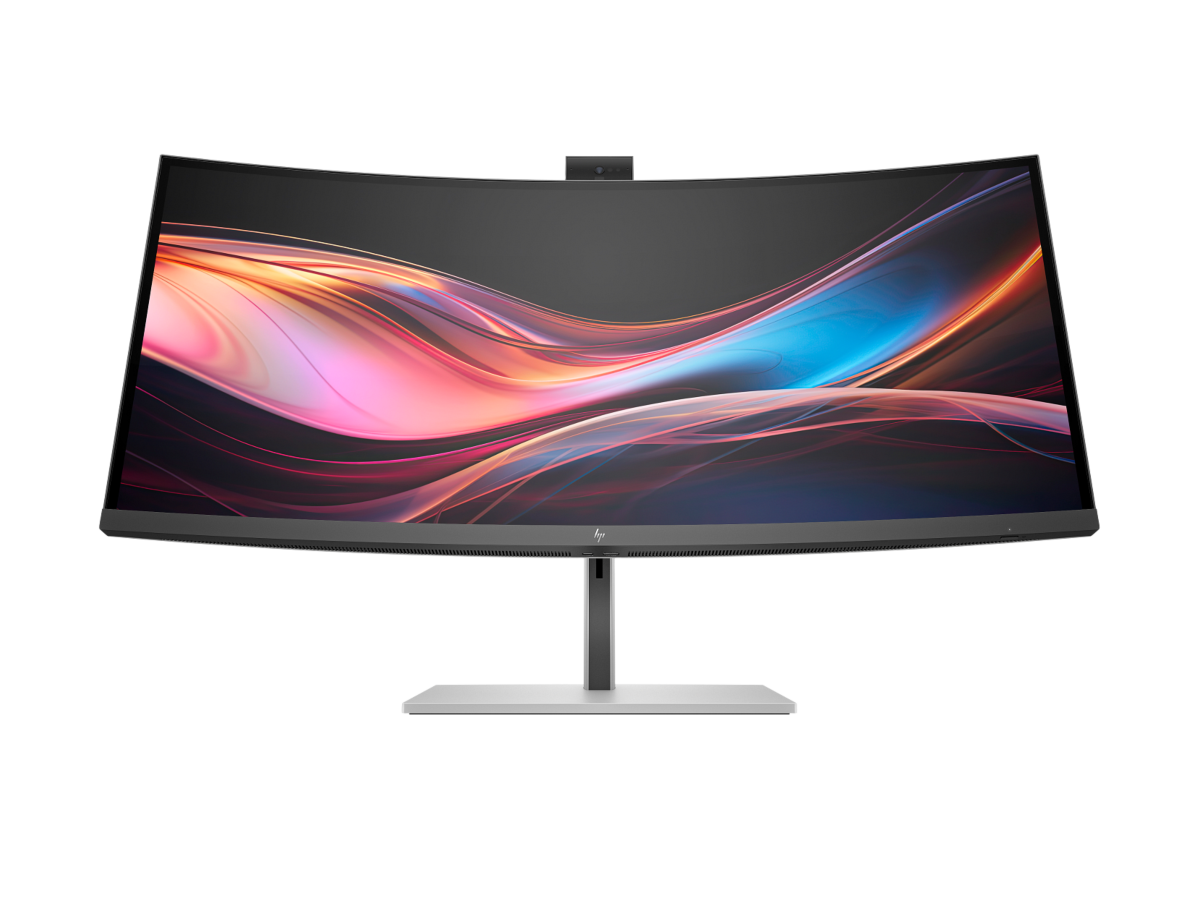
HP Series 7 Pro 34-inch WQHD Conferencing Monitor 734pm
Excellent built-in conferencing package, but expensive keeps it from being universal.
- Excellent built-in conferencing package
- Thunderbolt 4 dock, KVM and broad I/O
- 120 Hz IPS Black panel
- Strong fit for hybrid work and device switching
- Expensive
- Low pixel density beside 5K2K displays
- Limited HDR
- Hybrid professionals who will use the webcam, audio, KVM and docking features daily
- Basic office users who do not need conferencing hardware or high-end docking
HP 734pm ranks eighth for a genuinely distinct reason: its built-in conferencing package (webcam, audio, and dock in one) is a real advantage for hybrid professionals that none of the higher-ranked curved productivity monitors specifically offer, though its lower pixel density next to the 5K2K displays above it is a real trade-off.
Its built-in conferencing package — integrated webcam, audio, and dock — is genuinely useful daily for hybrid professionals who need device switching, backed by a Thunderbolt 4 dock, KVM, and a 120Hz IPS Black panel, though pixel density trails the 5K2K displays higher in this list.
A current HP support route is available. Public evidence does not establish a population-level long-term failure rate for this exact model.
| Screen Size | 34-inch |
|---|---|
| Aspect Ratio | 21:9 |
| Native Resolution | 3440 x 1440 |
| Maximum Refresh Rate | 120 Hz |
| Panel Technology | IPS Black |
| Connectivity Summary | Thunderbolt 4 with 100W charging, KVM and conferencing hub |
| Specification Scope | exact model |

LG UltraFine evo 40U990A-W
Sharp 5K2K desktop, but very high price keeps it from being universal.
- Sharp 5K2K desktop
- 120 Hz and IPS Black improve daily office use
- Thunderbolt 5 with 96 W charging and daisy chaining
- Strong creator-oriented gamut and HDR specification
- Very high price
- Independent laboratory testing remains limited
- Large 40-inch geometry will not suit every desk
- Early adopters wanting a modern 5K2K Thunderbolt 5 workstation display
- Value-focused buyers or anyone wanting a mature body of independent testing
UltraFine evo 40U990A-W ranks ninth for being an early adopter of Thunderbolt 5, a genuine forward-looking connectivity advantage none of the other curved monitors in this list offer — but it lands near the bottom because independent lab testing on this exact model remains limited compared to the more thoroughly reviewed Dell monitors ranked above it.
Its 5K2K resolution and 120Hz IPS Black panel target daily office use with a strong creator-oriented color gamut and HDR specification, backed by Thunderbolt 5 connectivity with 96W charging and daisy chaining — though independent lab testing on this exact model remains limited so far.
A current LG support route is available. Public evidence does not establish a population-level long-term failure rate for this exact model.
| Screen Size | 40-inch |
|---|---|
| Aspect Ratio | 21:9 |
| Native Resolution | 5120 x 2160 |
| Maximum Refresh Rate | 120 Hz |
| Panel Technology | Nano IPS Black |
| Connectivity Summary | Thunderbolt 5 with 96W charging |
| Specification Scope | exact model |

MSI MPG 341CQR QD-OLED X36
Outstanding 360 Hz motion clarity, but oled burn-in care matters for static office layouts keeps it from being universal.
- Outstanding 360 Hz motion clarity
- Excellent QD-OLED contrast and color
- Modern DisplayPort 2.1a and HDMI 2.1
- USB-C provides 98 W charging
- OLED burn-in care matters for static office layouts
- Text rendering is weaker than high-density IPS
- Only 3440 x 1440
- Users combining serious gaming with creative and general work
- Static all-day office dashboards, maximum text clarity or low-maintenance fleet deployment
MPG 341CQR rounds out this list because its 360Hz QD-OLED panel is built for motion clarity and gaming speed, a genuinely different priority than the productivity-focused curved monitors ranked above it — but weaker text rendering than high-density IPS and OLED burn-in considerations for static office layouts are real trade-offs for a curved-monitor list leaning toward office use.
Independent testing measured review found exceptional speed, color volume and accuracy, while OLED ownership and productivity text behavior remain relevant trade-offs.
A current MSI support route is available. Public evidence does not establish a population-level long-term failure rate for this exact model.
| Screen Size | 34-inch |
|---|---|
| Aspect Ratio | 21:9 |
| Native Resolution | 3440 x 1440 |
| Maximum Refresh Rate | 360 Hz |
| Panel Technology | QD-OLED |
| Connectivity Summary | DisplayPort 2.1a, HDMI 2.1 and USB-C with 98W charging |
| Specification Scope | exact model |
How We Evaluate Curved Monitors
Our rankings are built through the Flickthru CORE™ Market Research Engine, which first analyses the category, its intended buyers, and the current US market. Products are then assessed using category-specific evidence, performance indicators, availability, ownership signals, and long-term reliability considerations.
Recommendations reflect overall suitability for the intended buyer – not simply the highest specification, lowest price, or strongest result in a single test. When product-level customer feedback is limited, we prioritize official validation, credible technical evidence, and demonstrated category suitability rather than estimating or inflating review counts. Read the full Flickthru product ranking methodology.
- Category Specific Analysis: Defining buyers’ needs, primary uses, business priorities, acceptable compromises, and category-specific requirements before products are compared.
- Long-Term Reliability: Tracking recurring failure patterns, component durability, warranty trends, and long-term ownership outcomes from verified market data.
- Performance: Evaluating category-specific real-world performance, efficiency, consistency, and practical usability rather than relying on marketing claims alone.
- Features: Assessing functionality, usability, build quality, safety, ergonomics, and category-specific capabilities important to long-term ownership.
- Value: Measuring total cost of ownership, lifecycle longevity, support quality, lifecycle suitability, and overall return on investment.
- Evidence Review: Combining verified purchaser feedback where available with professional testing, official product validation, technical evidence, and market suitability signals.
- Market Coverage: Mapping the current US market, credible product families, availability, price positioning, and relevant competitors within the category.
Products demonstrating recurring reliability concerns, inconsistent performance behavior, poor ownership outcomes, or widespread negative sentiment are algorithmically suppressed from our rankings regardless of marketing claims, sponsorship relationships, or short-term popularity trends.
This methodology is designed to identify products that deliver genuine long-term value, reliability, and real-world usefulness rather than simply matching short-term hype, advertising claims, or isolated test results.