
Best Trackball Mice 2026
A category-specific approach to ranking Trackball Mice
Most general product roundups are built around broad buyer priorities. Flickthru evaluates trackball mice for office workers, prioritising sustained comfort fit and posture, trackball control and adaptation, precision tracking and cursor control, scrolling buttons and workflow, and connectivity and power reliability.
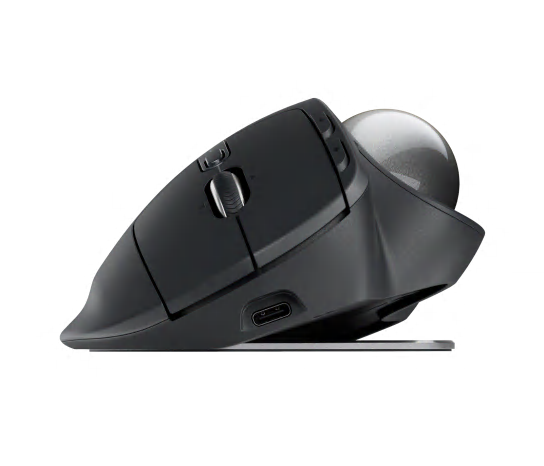
Logitech MX Ergo S
Logitech’s flagship thumb trackball, with adjustable tilt, quiet clicks, and multi-device Bluetooth/Bolt switching built for sustained daily office use.
- Best overall for right-handed office users who want tilt, quiet clicks and deep workflow controls
- Stationary thumb control reduces the desk travel required by a conventional mouse
- Sustained comfort fit and posture is one of this product’s strongest evaluated areas
- Compatibility software and deployment is one of this product’s strongest evaluated areas
- Not ideal for left-handed users or buyers who dislike thumb-operated trackballs
- Trackball operation requires an adaptation period and comfort is hand-fit dependent
- Value for money is a relative trade-off compared with this product’s stronger evaluated areas
Tops the list with a CORE score of 87, spread evenly across an 88 in comfort/posture, trackball control and precision/tracking — the adjustable 0-20° tilt and multi-device switching make it the most well-rounded thumb trackball tested, held back only by a 74 value-for-money score, the lowest in the group.
The adjustable tilt (0-20 degrees) is the defining feature here, letting the wrist rest in a more neutral position than a fixed-angle trackball; precision is strong once the thumb adapts to controlling the ball rather than the whole hand.
Logitech’s standard hardware warranty applies. A real US owner-review base (391 ratings averaging 4.5/5) supports genuine day-to-day satisfaction, though no independent long-term fleet failure-rate data was found.
- for left-handed users or buyers who dislike thumb-operated trackballs
| Trackball Type | tilting thumb trackball |
|---|---|
| Handedness | model-specific; verify hand and ball-operation preference |
| Connectivity | Verify the exact current configuration on the official page before purchase. |
| Software | Optional remapping support varies by model and managed-device policy. |

ELECOM HUGE Plus
ELECOM’s largest finger trackball, built around a 52.5mm ball and eight buttons for button-heavy technical and creative workflows.
- Best for large-hand users and button-heavy technical workflows
- Stationary finger control reduces the desk travel required by a conventional mouse
- Scrolling buttons and workflow is one of this product’s strongest evaluated areas
- Trackball control and adaptation is one of this product’s strongest evaluated areas
- Not ideal for small hands, simple setups or buyers wanting a compact device
- Trackball operation requires an adaptation period and comfort is hand-fit dependent
- Build support and durability is a relative trade-off compared with this product’s stronger evaluated areas
Scores 85, led by a 90 in scrolling, buttons and workflow and an 89 in trackball control and adaptation — the oversized 52.5mm ball and eight buttons give it the deepest control set of any trackball reviewed, though build/durability (78) and compatibility/software (79) are more modest.
The oversized ball gives a wide range of motion per rotation, which favors fast cursor travel across large or multi-monitor setups, though it takes more desk-adjacent hand movement than a compact thumb design.
ELECOM’s standard warranty applies. A smaller but positive owner-review sample (47 ratings averaging 4.2/5) was found; no independent long-term failure-rate data exists beyond that.
- for small hands, simple setups or buyers wanting a compact device
| Trackball Type | large finger trackball |
|---|---|
| Handedness | model-specific; verify hand and ball-operation preference |
| Connectivity | Verify the exact current configuration on the official page before purchase. |
| Software | Optional remapping support varies by model and managed-device policy. |
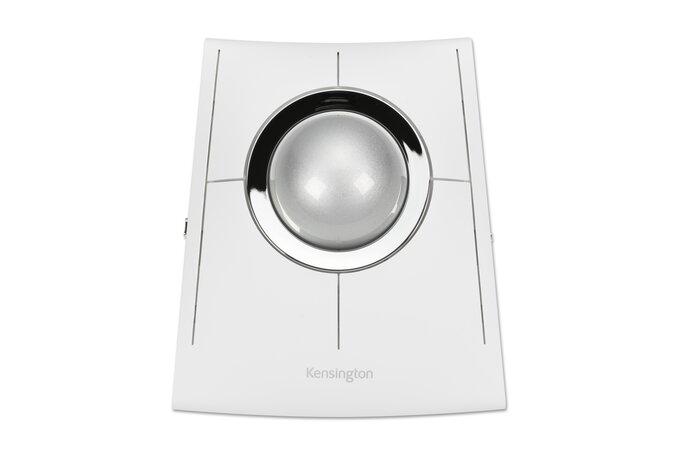
Kensington SlimBlade Pro
An ambidextrous, ball-in-center design with a 4-way scroll ring, aimed at buyers who want spacious, deliberate cursor control.
- Best ambidextrous premium finger trackball for spacious, deliberate control
- Stationary finger control reduces the desk travel required by a conventional mouse
- Trackball control and adaptation is one of this product’s strongest evaluated areas
- Precision tracking and cursor control is one of this product’s strongest evaluated areas
- Not ideal for users who want a conventional physical scroll wheel
- Trackball operation requires an adaptation period and comfort is hand-fit dependent
- Value for money is a relative trade-off compared with this product’s stronger evaluated areas
Also 85, anchored by an 88 in trackball control and adaptation and an 87 in precision/tracking — the centered ball and 4-way scroll ring support especially deliberate cursor control, offset by a 76 value score.
The centered ball and 4-way scroll ring support fine, deliberate cursor control well suited to detail work, at the cost of a larger footprint than finger- or thumb-only designs.
Kensington’s standard warranty applies. A real owner-review base (330 ratings averaging 4.3/5) supports genuine satisfaction, though no independent long-term failure-rate data was found.
- for users who want a conventional physical scroll wheel
| Trackball Type | ambidextrous finger trackball |
|---|---|
| Handedness | ambidextrous |
| Connectivity | Verify the exact current configuration on the official page before purchase. |
| Software | Optional remapping support varies by model and managed-device policy. |
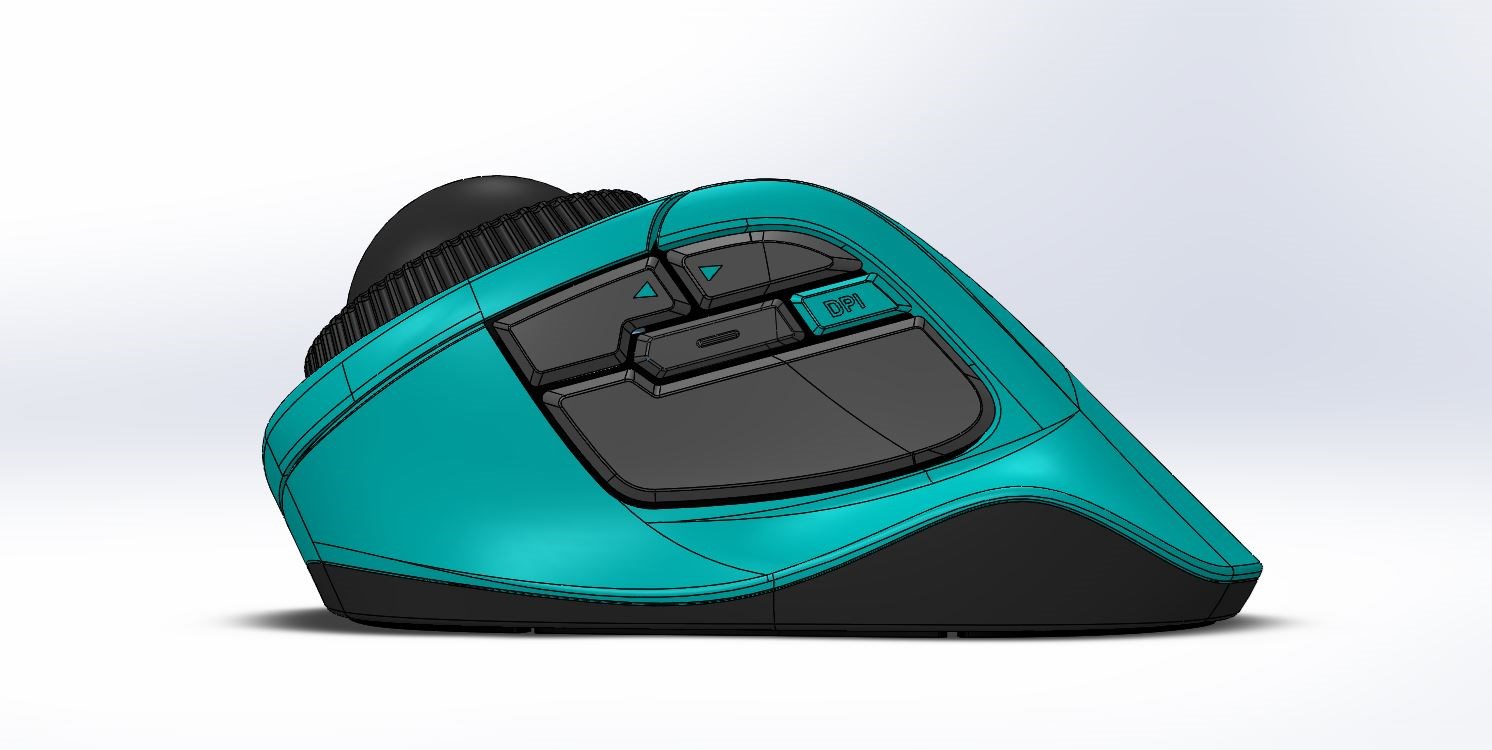
Kensington Orbit Fusion Wireless Trackball
A compact, budget-friendly finger trackball with a simple scroll ring, aimed at right-handed users who want an easy switch from a conventional mouse.
- Best for right-handed users wanting finger control with a familiar scroll ring
- Stationary finger control reduces the desk travel required by a conventional mouse
- Scrolling buttons and workflow is one of this product’s strongest evaluated areas
- Trackball control and adaptation is one of this product’s strongest evaluated areas
- Not ideal for left-handed use or buyers who prefer a low-profile palm position
- Trackball operation requires an adaptation period and comfort is hand-fit dependent
- Compatibility software and deployment is a relative trade-off compared with this product’s stronger evaluated areas
Reaches 84 with an 88 in scrolling, buttons and workflow, its strongest category — the simple finger-ball layout and quick-access scroll ring make it an easy switch from a conventional mouse, backed by a solid 79 value score.
Straightforward finger-ball control with a scroll ring positioned for quick access; precision is adequate for everyday browsing and document work rather than fine-detail tasks.
Kensington’s standard warranty applies. A small but very positive owner-review sample (45 ratings averaging 4.9/5) was found; the small sample size means this should be weighed cautiously against larger-sample competitors.
- for left-handed use or buyers who prefer a low-profile palm position
| Trackball Type | right-handed finger trackball |
|---|---|
| Handedness | model-specific; verify hand and ball-operation preference |
| Connectivity | Verify the exact current configuration on the official page before purchase. |
| Software | Optional remapping support varies by model and managed-device policy. |

ELECOM DEFT PRO
A compact right-handed finger trackball with eight buttons and dedicated customization software, built for shortcut-heavy work.
- Best compact feature-rich finger trackball for shortcut-heavy work
- Stationary finger control reduces the desk travel required by a conventional mouse
- Scrolling buttons and workflow is one of this product’s strongest evaluated areas
- Trackball control and adaptation is one of this product’s strongest evaluated areas
- Not ideal for buyers wanting simple software-free deployment
- Trackball operation requires an adaptation period and comfort is hand-fit dependent
- Build support and durability is a relative trade-off compared with this product’s stronger evaluated areas
Also 84, led by an 88 in scrolling, buttons and workflow and an 87 in trackball control and adaptation — the compact right-handed shape and dedicated customization software suit shortcut-heavy work, with build/durability (77) as its main trade-off.
The compact finger-ball layout keeps the hand close to the buttons, which suits users who lean on shortcut keys during technical work, though the smaller ball offers less fine-motion range than larger designs.
ELECOM’s standard warranty applies. No owner-review aggregate could be confirmed for this exact model during research, and no independent long-term failure-rate data was found.
- for buyers wanting simple software-free deployment
| Trackball Type | right-handed finger trackball |
|---|---|
| Handedness | model-specific; verify hand and ball-operation preference |
| Connectivity | Verify the exact current configuration on the official page before purchase. |
| Software | Optional remapping support varies by model and managed-device policy. |
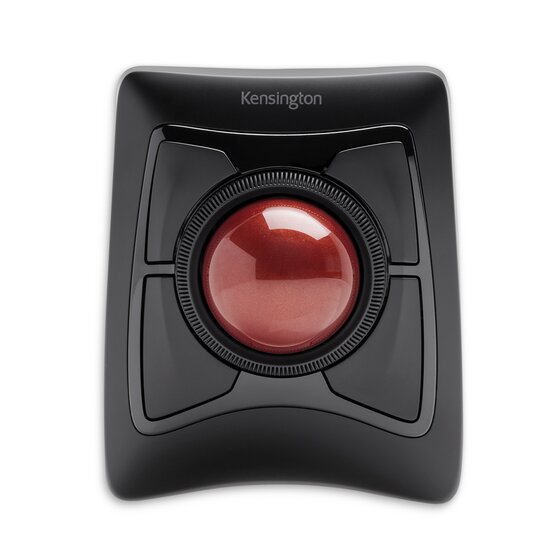
Kensington Expert Mouse Wireless Trackball
The industry-standard large-ball ambidextrous trackball, with a scroll ring and a decades-long track record on shared and single-user desks alike.
- Best for large-ball precision and ambidextrous shared desks
- Stationary finger control reduces the desk travel required by a conventional mouse
- Trackball control and adaptation is one of this product’s strongest evaluated areas
- Precision tracking and cursor control is one of this product’s strongest evaluated areas
- Not ideal for small hands or very compact bags
- Trackball operation requires an adaptation period and comfort is hand-fit dependent
- Value for money is a relative trade-off compared with this product’s stronger evaluated areas
Matches that 84 score on the strength of an 87 in trackball control and adaptation — the large 55mm ball and decades of use on shared desks give it a proven track record, though compatibility/software (79) is comparatively weak.
The large 55mm ball is widely regarded as offering some of the smoothest, most precise cursor control of any trackball design, a big part of why this model has stayed in continuous production for decades.
Kensington’s standard warranty applies. This model has by far the largest confirmed owner-review base in this shortlist (8,654 ratings, averaging roughly 4/5), reflecting its long market history, though no independent long-term failure-rate study was found.
- for small hands or very compact bags
| Trackball Type | large ambidextrous finger trackball |
|---|---|
| Handedness | ambidextrous |
| Connectivity | Verify the exact current configuration on the official page before purchase. |
| Software | Optional remapping support varies by model and managed-device policy. |
Logitech ERGO M575S
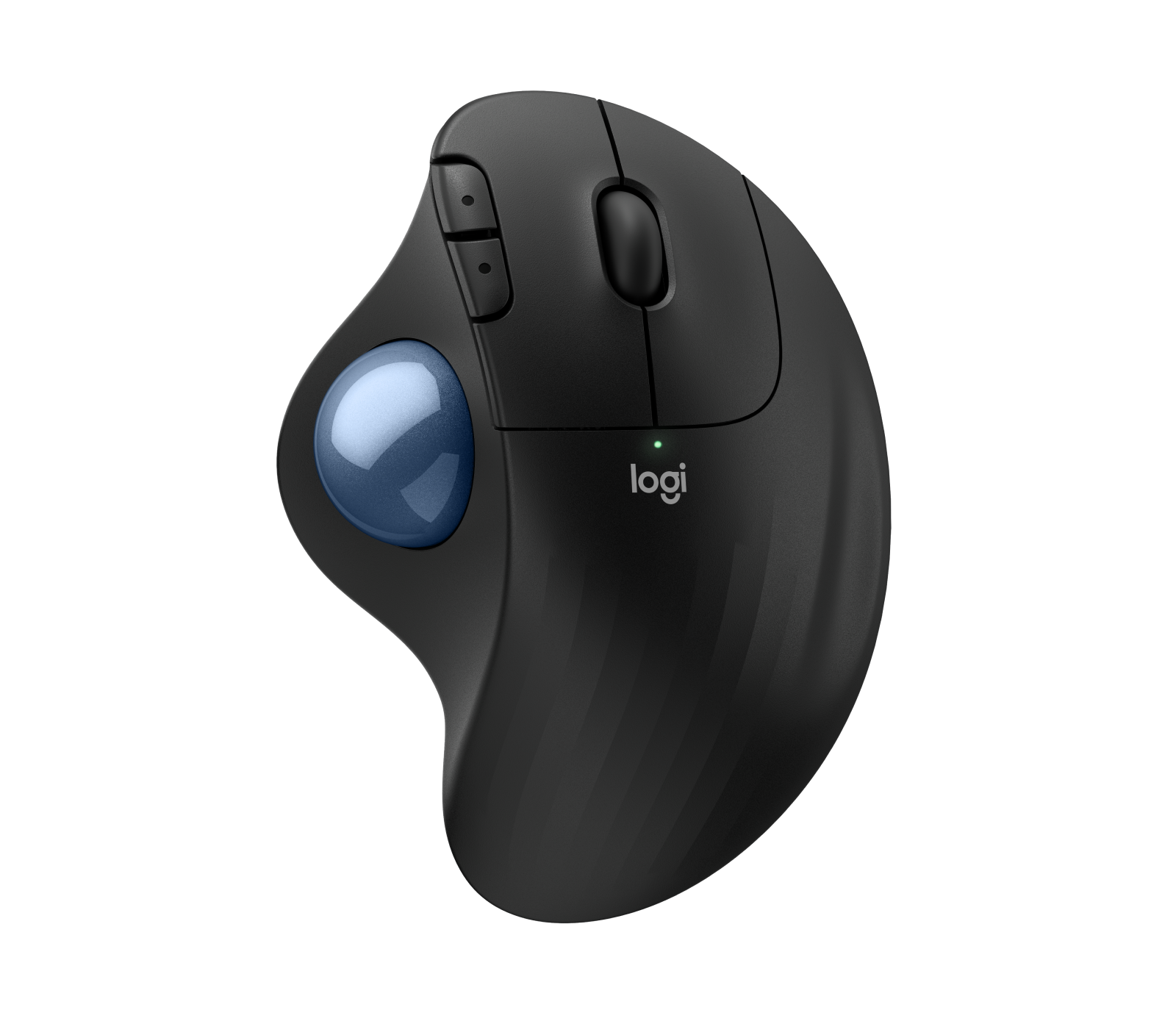
A budget-friendly mainstream thumb trackball with USB-C rechargeable battery, aimed at routine office work rather than heavy customization.
- Best-value mainstream thumb trackball for routine office work
- Stationary thumb control reduces the desk travel required by a conventional mouse
- Connectivity and power reliability is one of this product’s strongest evaluated areas
- Value for money is one of this product’s strongest evaluated areas
- Not ideal for left-handed users or those needing many programmable controls
- Trackball operation requires an adaptation period and comfort is hand-fit dependent
- Scrolling buttons and workflow is a relative trade-off compared with this product’s stronger evaluated areas
Also 84, but takes a different path there: an 87 in connectivity/power reliability and an 87 value score, the best value mark in the guide — the USB-C rechargeable battery and lower price offset a more basic 78 in scrolling/workflow controls.
A simpler thumb-ball action than Logitech’s higher-end MX Ergo line, trading some precision and tilt adjustability for a lower price and easier day-one setup.
Logitech’s standard hardware warranty applies. A substantial owner-review base (2,124 ratings averaging 4.3/5) supports genuine day-to-day satisfaction, though no independent long-term failure-rate data was found.
- for left-handed users or those needing many programmable controls
| Trackball Type | thumb trackball |
|---|---|
| Handedness | model-specific; verify hand and ball-operation preference |
| Connectivity | Verify the exact current configuration on the official page before purchase. |
| Software | Optional remapping support varies by model and managed-device policy. |

ELECOM EX-G Pro
A right-handed thumb trackball with an ergonomic slanted shape and extra programmable controls, part of ELECOM’s higher-end office line.
- Best for right-handed users wanting extra controls in a thumb trackball
- Stationary thumb control reduces the desk travel required by a conventional mouse
- Scrolling buttons and workflow is one of this product’s strongest evaluated areas
- Precision tracking and cursor control is one of this product’s strongest evaluated areas
- Not ideal for small hands or tightly managed computers requiring zero software
- Trackball operation requires an adaptation period and comfort is hand-fit dependent
- Build support and durability is a relative trade-off compared with this product’s stronger evaluated areas
Scores 83, led by an 87 in scrolling, buttons and workflow — the slanted ergonomic shape and extra programmable buttons add real shortcut capacity, though build/durability (77) is the lowest mark among its categories.
The slanted ergonomic shape keeps the wrist angled naturally while thumb-operating the ball; the extra buttons add real shortcut capacity for right-handed users comfortable with the learning curve.
ELECOM’s standard warranty applies. No owner-review aggregate could be confirmed for this exact model during research, and no independent long-term failure-rate data was found.
- for small hands or tightly managed computers requiring zero software
| Trackball Type | right-handed thumb trackball |
|---|---|
| Handedness | model-specific; verify hand and ball-operation preference |
| Connectivity | Verify the exact current configuration on the official page before purchase. |
| Software | Optional remapping support varies by model and managed-device policy. |
Kensington Orbit Wireless Trackball with Scroll Ring
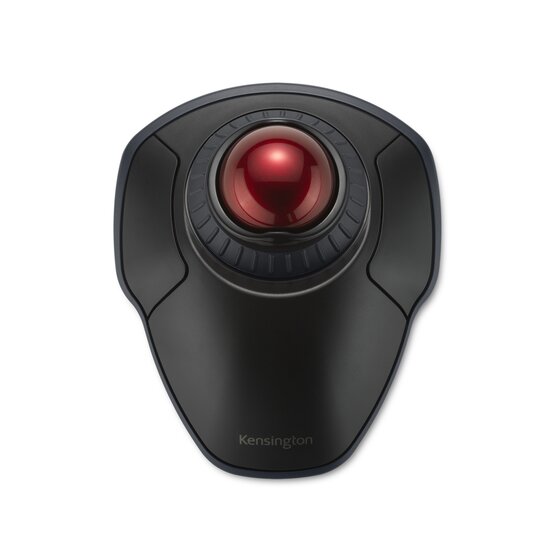
A simple ambidextrous finger trackball with intuitive scroll-ring navigation, aimed at buyers who want straightforward wireless operation.
- Best straightforward wireless finger trackball with intuitive ring scrolling
- Stationary finger control reduces the desk travel required by a conventional mouse
- Value for money is one of this product’s strongest evaluated areas
- Scrolling buttons and workflow is one of this product’s strongest evaluated areas
- Not ideal for users needing many programmable buttons
- Trackball operation requires an adaptation period and comfort is hand-fit dependent
- Compatibility software and deployment is a relative trade-off compared with this product’s stronger evaluated areas
Also 83, with connectivity/power reliability (83) and value for money (84) as its most even strengths — the straightforward finger-ball design and dedicated scroll ring keep navigation simple, at the cost of a more basic 78 in compatibility/software.
Finger-ball control paired with a dedicated scroll ring keeps navigation simple, though the feature set is more basic than pricier ambidextrous alternatives.
Kensington’s standard warranty applies. A sizable owner-review base (1,221 ratings averaging 3.9/5) was found — the lowest average in this shortlist, worth weighing against its lower price point — though no independent long-term failure-rate data exists.
- for users needing many programmable buttons
| Trackball Type | ambidextrous finger trackball |
|---|---|
| Handedness | ambidextrous |
| Connectivity | Verify the exact current configuration on the official page before purchase. |
| Software | Optional remapping support varies by model and managed-device policy. |

ProtoArc EM01 NL
A budget tilting thumb trackball with multi-device Bluetooth switching, aimed at home-office buyers managing more than one computer.
- Best budget tilting thumb design for multi-device home offices
- Stationary thumb control reduces the desk travel required by a conventional mouse
- Value for money is one of this product’s strongest evaluated areas
- Connectivity and power reliability is one of this product’s strongest evaluated areas
- Trackball operation requires an adaptation period and comfort is hand-fit dependent
- Build support and durability is a relative trade-off compared with this product’s stronger evaluated areas
- Scrolling buttons and workflow is a relative trade-off compared with this product’s stronger evaluated areas
Rounds out the group at 83, led by an 86 value-for-money score, among the best in the guide — the tilting thumb-ball design and multi-device Bluetooth switching stand out at this price, though build/durability (76) is the lowest of any trackball reviewed.
The tilting thumb-ball design and multi-device switching are the standout features at this price point, though build materials and precision trail the more established brands in this shortlist.
ProtoArc’s standard warranty applies. A sizable owner-review base across multiple marketplaces (roughly 3,400 ratings averaging 4.3/5) supports genuine satisfaction, though as a newer brand it has a shorter track record than the established names in this shortlist.
- Trackball operation requires an adaptation period and comfort is hand-fit dependent.
- Build support and durability is a relative trade-off compared with this product’s stronger evaluated areas.
- Scrolling buttons and workflow is a relative trade-off compared with this product’s stronger evaluated areas.
| Trackball Type | tilting thumb trackball |
|---|---|
| Handedness | model-specific; verify hand and ball-operation preference |
| Connectivity | Verify the exact current configuration on the official page before purchase. |
| Software | Optional remapping support varies by model and managed-device policy. |
How We Evaluate Trackball Mice
Our rankings are built through the Flickthru CORE™ Market Research Engine, which first analyses the category, its intended buyers, and the current US market. Products are then assessed using category-specific evidence, performance indicators, availability, ownership signals, and long-term reliability considerations.
Recommendations reflect overall suitability for the intended buyer – not simply the highest specification, lowest price, or strongest result in a single test. When product-level customer feedback is limited, we prioritize official validation, credible technical evidence, and demonstrated category suitability rather than estimating or inflating review counts. Read the full Flickthru product ranking methodology.
- Category Specific Analysis: Defining buyers’ needs, primary uses, business priorities, acceptable compromises, and category-specific requirements before products are compared.
- Long-Term Reliability: Tracking recurring failure patterns, component durability, warranty trends, and long-term ownership outcomes from verified market data.
- Performance: Evaluating category-specific real-world performance, efficiency, consistency, and practical usability rather than relying on marketing claims alone.
- Features: Assessing functionality, usability, build quality, safety, ergonomics, and category-specific capabilities important to long-term ownership.
- Value: Measuring total cost of ownership, lifecycle longevity, support quality, lifecycle suitability, and overall return on investment.
- Evidence Review: Combining verified purchaser feedback where available with professional testing, official product validation, technical evidence, and market suitability signals.
- Market Coverage: Mapping the current US market, credible product families, availability, price positioning, and relevant competitors within the category.
Products demonstrating recurring reliability concerns, inconsistent performance behavior, poor ownership outcomes, or widespread negative sentiment are algorithmically suppressed from our rankings regardless of marketing claims, sponsorship relationships, or short-term popularity trends.
This methodology is designed to identify products that deliver genuine long-term value, reliability, and real-world usefulness rather than simply matching short-term hype, advertising claims, or isolated test results.