
Best Docking Stations 2026
A category-specific approach to ranking Docking Stations
Most general product roundups are built around broad buyer priorities. Flickthru evaluates docking stations for remote and hybrid professionals connecting a laptop to multiple monitors, wired networking, and peripherals at a desk — this ranking should help them identify which dock delivers reliable multi-display output, sufficient power delivery to charge their laptop, and stable connectivity without dropouts or driver issues, prioritising display and multi monitor support, power delivery to laptop, connectivity speed and reliability, port selection and expandability, and platform compatibility.
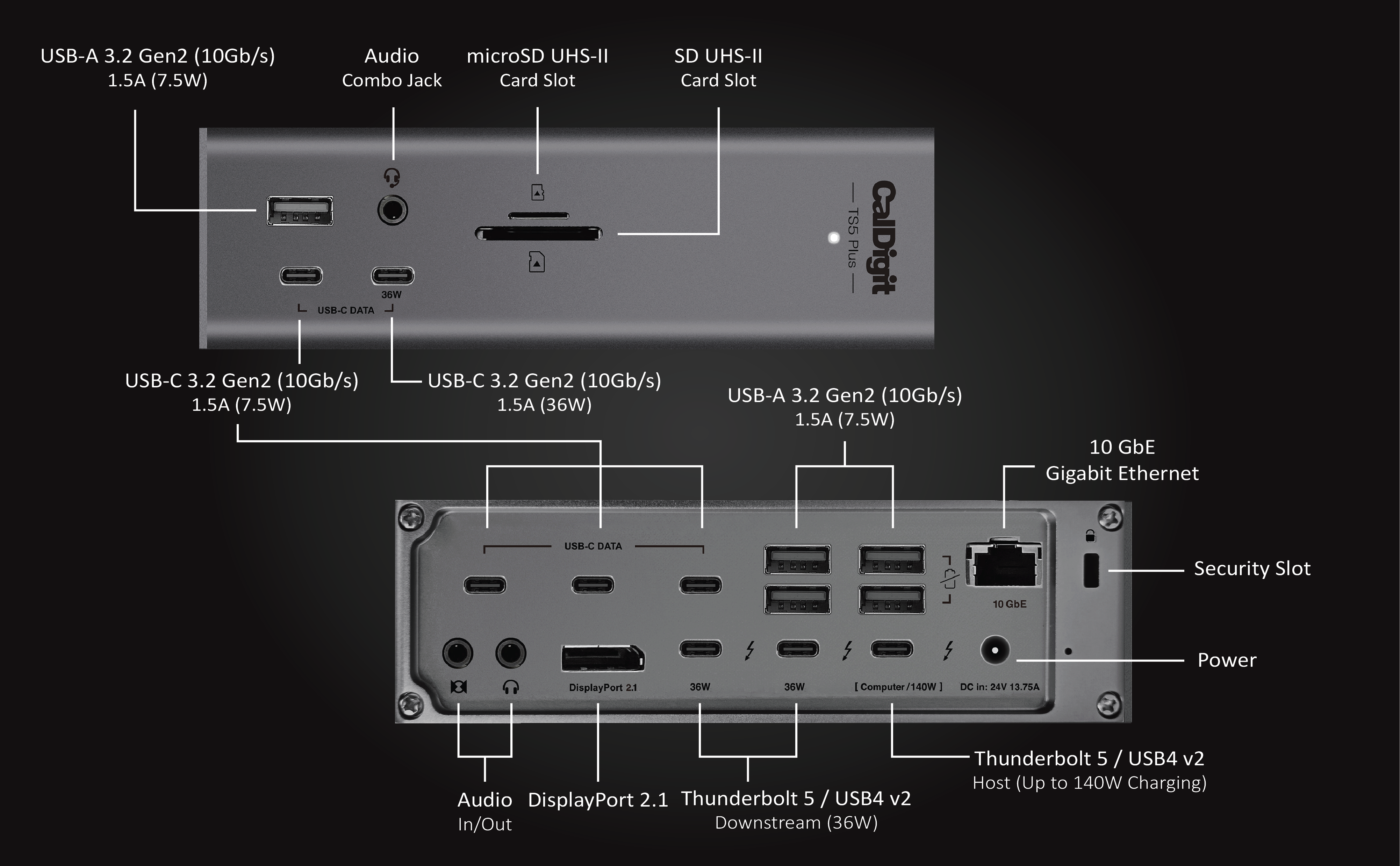
CalDigit TS5 Plus
The most port-dense and highest-power Thunderbolt 5 dock available, with dual 4K/240Hz and 10GbE headroom that no rival in this shortlist matches — at a premium price and with a small number of independent heat reports worth knowing about.
- 20 total ports including dual card readers, 10GbE and DisplayPort 2.1
- 140W host charging, the highest in this shortlist
- Dual independent USB controllers boost aggregate USB throughput for multi-drive workflows
- Scores 95/100 on port selection and expandability, among the strongest dimensions evaluated for this product
- The most expensive dock in this shortlist at $499.99
- A handful of independent reports describe the unit running hot under sustained load
- Large 330W external power supply takes real desk or floor space
The single most port-dense and highest-power Thunderbolt 5 dock in the field, combining class-leading expansion and charging headroom. It takes first place on capability, while its premium price and unresolved heat reports keep the recommendation qualified.
Independent testing identifies the 20-port layout, dual USB controllers and 10GbE as the standout capabilities for demanding multi-device workflows. Display support is strong but host-dependent, topping out at dual 4K@240Hz or triple 4K@144Hz only on the newest Thunderbolt 5 Windows PCs and top-tier Apple Silicon chips.
CalDigit’s own store shows a small but perfect 5.0/5 rating from 6 reviews. Separate reporting recorded multiple user accounts of the unit running hot, including one claimed 55°C surface temperature, but the temperature was not independently reproduced. This remains an open question rather than a confirmed defect.
- Buyers on a Thunderbolt 3 or 4 laptop who won’t benefit from the TB5 headroom, or anyone wanting the smallest possible desk footprint.
| Connection Standard | Thunderbolt 5 host port up to 120Gbps (Bandwidth Boost), 3x TB5 ports total (1 host + 2 downstream at 80Gbps) |
|---|---|
| Power Delivery To Host | 140W host charging; downstream TB5 ports also deliver up to 36W each |
| Port Count And Mix | 20 total ports: 5x USB-C 10Gbps, 5x USB-A 10Gbps, DisplayPort 2.1, 10 Gigabit Ethernet, SD 4.0 + microSD 4.0 (UHS-II), dual audio jacks |
| Max Display Support | Dual 4K@240Hz on Windows TB5 laptops; dual 4K@60Hz on supporting Macs, triple 4K@144Hz on some Windows TB5 configs |
| Unique Feature | Dual independent 10Gb/s USB controllers for higher aggregate USB bandwidth versus single-controller docks |
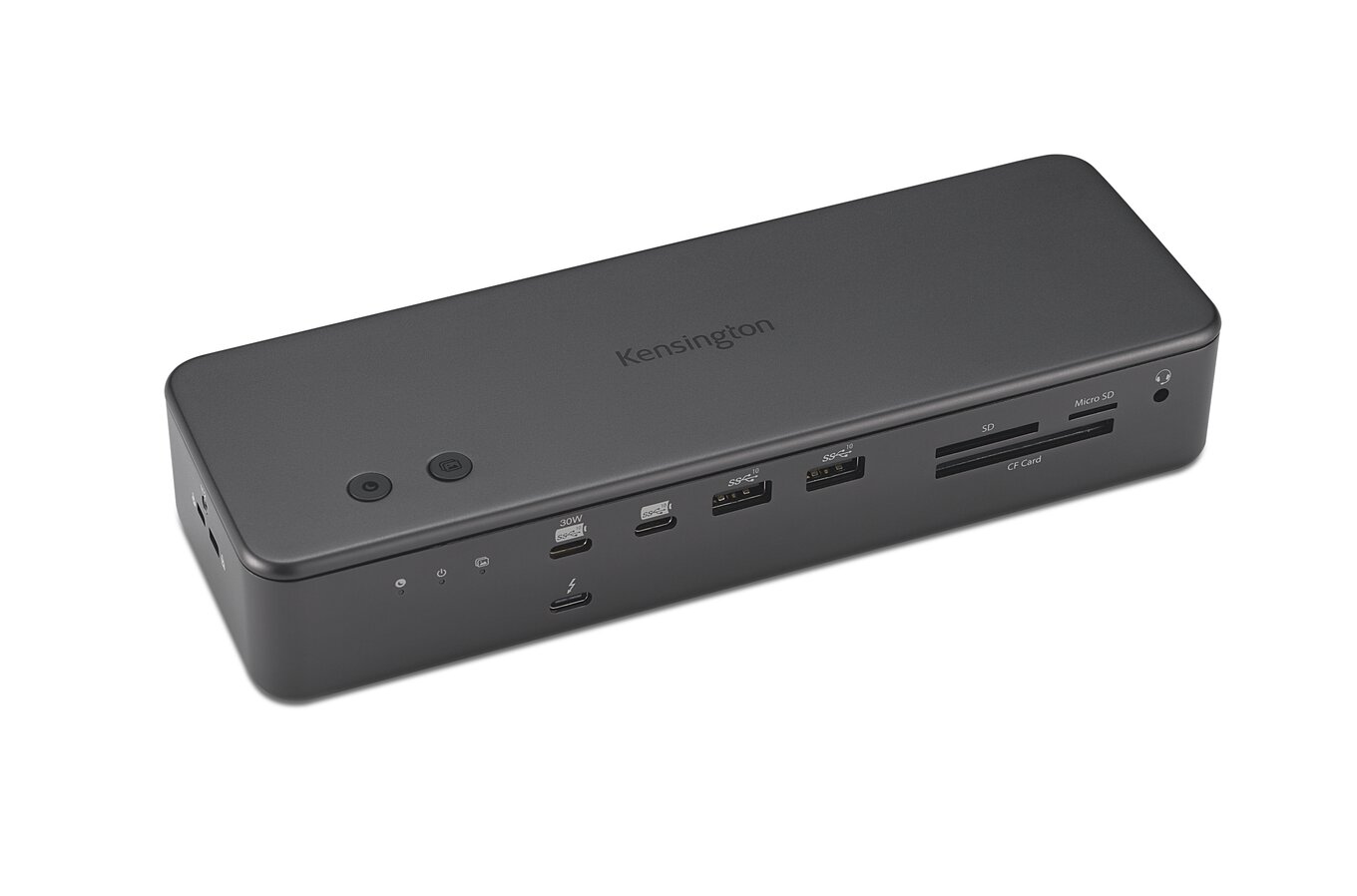
Kensington SD7100T5 EQ Pro 19-in-1 Thunderbolt 5 Docking Station
The most feature-dense prosumer dock tested, with an internal M.2 SSD slot and CompactFlash support no rival offers, aimed squarely at creative professionals rather than typical office use.
- Internal, lockable M.2 PCIe 4.0 SSD slot — unique in this shortlist
- CompactFlash, SD and microSD readers plus two programmable Konnect-software buttons
- Independently measured 80-85W sustained power delivery under normal load
- Scores 96/100 on port selection and expandability, among the strongest dimensions evaluated for this product
- No native video-out port; needs an adapter for non-USB-C displays
- $449.99 MSRP is the highest list price found among this shortlist’s non-flagship-tier docks
- One test session logged a power-delivery failure during a gaming workload that the reviewer attributed to a possible host-side issue
The most feature-dense prosumer dock found, with an internal SSD slot and CompactFlash support that no other shortlisted product offers, but priced and positioned for creative professionals rather than typical hybrid-office use.
Independent testing measured 80–85W sustained power delivery under normal load, with one failed-delivery event during a gaming session that appeared more likely host-side than dock-side. Separate testing confirmed up to three 4K/144Hz displays on a compatible Windows Thunderbolt 5 host, dropping to dual 6K/60Hz on macOS.
No numeric owner-review aggregate was found; Walmart’s listed 4.6-star/6,524-review figure is explicitly labeled a marketplace-seller rating for the reselling retailer, not a product owner-review score, and was correctly excluded rather than presented as product reliability data.
- General office/hybrid workers who don’t need an internal SSD slot or CompactFlash support and would rather spend less on a simpler dock.
| Connection Standard | Thunderbolt 5 |
|---|---|
| Port Count And Mix | 19-in-1 including an internal M.2 SSD slot, hot keys, optical connection, offline charging, CompactFlash reader |
| Target User | High-end creative professional / prosumer |
| Form Factor | Full-size prosumer dock chassis with internal SSD bay |

iVanky FusionDock Max 2
The clearest current answer for Mac users who specifically need triple-display support from Apple Silicon, now confirmed by three independent sources — but strictly Mac-only, with no Windows support and no multi-Mac switching.
- Native triple external display support (up to 6K@60Hz x2 + 4K@60Hz) confirmed by two independent hands-on tests
- 23 total ports, the most of any Mac-focused dock in this shortlist
- Active cooling claimed to keep surface up to 68°F cooler than typical TB5 docks, aimed at long editing sessions
- Scores 90/100 on port selection and expandability, among the strongest dimensions evaluated for this product
- Explicitly incompatible with Windows and Chrome laptops
- Restricted to a single paired Mac — cannot switch between multiple Macs
- M3 Pro MacBook Pro and base Apple Silicon chips get reduced display support versus M4/M5 Max chips
The clearest current answer for Mac users who specifically need triple-display support from Apple Silicon via a dual-Thunderbolt-cable design, positioned by two independent sources as a genuine CalDigit TS5 Plus alternative for Mac-first buyers.
Official specifications and independent testing confirm native triple-display support that exceeds the CalDigit TS5 Plus’s display flexibility on Mac, including a smooth two-6K/60Hz-plus-one-4K/60Hz setup on an M4 Max MacBook Pro. Display capability scales down on less powerful Apple Silicon chips.
No numeric owner-review aggregate was found despite the exact Amazon product page being accessible. The manufacturer offers a 24-month warranty, and independent reviewers report the active cooling system worked as intended during extended testing.
- Anyone using both Windows and Mac machines, sharing a dock between multiple Macs, or on an Intel-based Mac — this dock will not work for those setups at all.
| Connection Standard | Thunderbolt 4, dual TB4 uplink cable design |
|---|---|
| Port Count | 23 ports in the reviewed Max 2 configuration |
| Max Display Support | Triple-display support on Apple Silicon via the dual-uplink design |
| Target Use Case | High-end Mac professionals needing more displays than a single-Thunderbolt-cable dock can drive |

Anker Prime TB5 Docking Station (14-in-1, 8K, Thunderbolt 5)
A compact, well-designed Thunderbolt 5 flagship with genuinely fast real-world file transfer, held back by underspecced UHS-I card readers and a documented sleep/wake bug affecting those same card slots.
- 140W host charging with no external power brick required
- Compact cube design that multiple reviewers call their favorite dock form factor
- Confirmed real-world file-transfer speeds up to 5-6 GB/s between external SSDs, versus a few hundred MB/s on an older dock
- Scores 90/100 on power delivery to laptop, among the strongest dimensions evaluated for this product
- SD/microSD readers are UHS-I only, slower than many rivals’ UHS-II readers
- A documented bug causes SD/microSD readers to stop working after sleep, requiring a dock power-cycle to fix
- Only one active display output (HDMI or DisplayPort, not both) at a time
The clear Thunderbolt 5 flagship pick across nearly every current roundup checked, combining the highest power delivery in this shortlist with genuine 8K/120Gbps headroom, at the cost of Mac display-support caveats on base Apple Silicon chips and a premium price.
Multiple independent tests confirm that 140W charging is sufficient for a 16-inch MacBook Pro, while one owner measured SSD-to-SSD transfers rising from a few hundred MB/s to 5–6 GB/s versus an older Thunderbolt dock. The consistent trade-off is UHS-I-only card reading, a step down from UHS-II rivals at this price.
No formal long-term failure-rate data was found. One detailed, specific Amazon US owner review documents SD/microSD readers becoming unresponsive after the laptop sleeps and waking, requiring the dock to be power-cycled to recover — a real and reproducible-sounding issue with no firmware fix confirmed at the time of that review.
- Photographers or videographers who rely heavily on fast SD/microSD card transfers, or anyone who frequently puts their laptop to sleep while docked.
| Connection Standard | Thunderbolt 5 upstream (backward compatible with TB4/USB4); NOT Thunderbolt 3 compatible |
|---|---|
| Power Delivery To Host | 140W max |
| Port Count And Mix | 14-in-1: 2x TB5 downstream, 2x USB-C 10Gbps (45W shared), 3x USB-A 10Gbps, 1x HDMI 2.1 or DP 2.1 (select one), 2.5GbE, SD+TF (UHS-I), audio combo |
| Max Display Support | Up to 8K@60Hz single display; dual 8K@60Hz on TB5 Windows laptops; base M1/M2/M3 Macs limited to one external display |
| Form Factor | Compact cube chassis, integrated cooling system, no separate power brick |
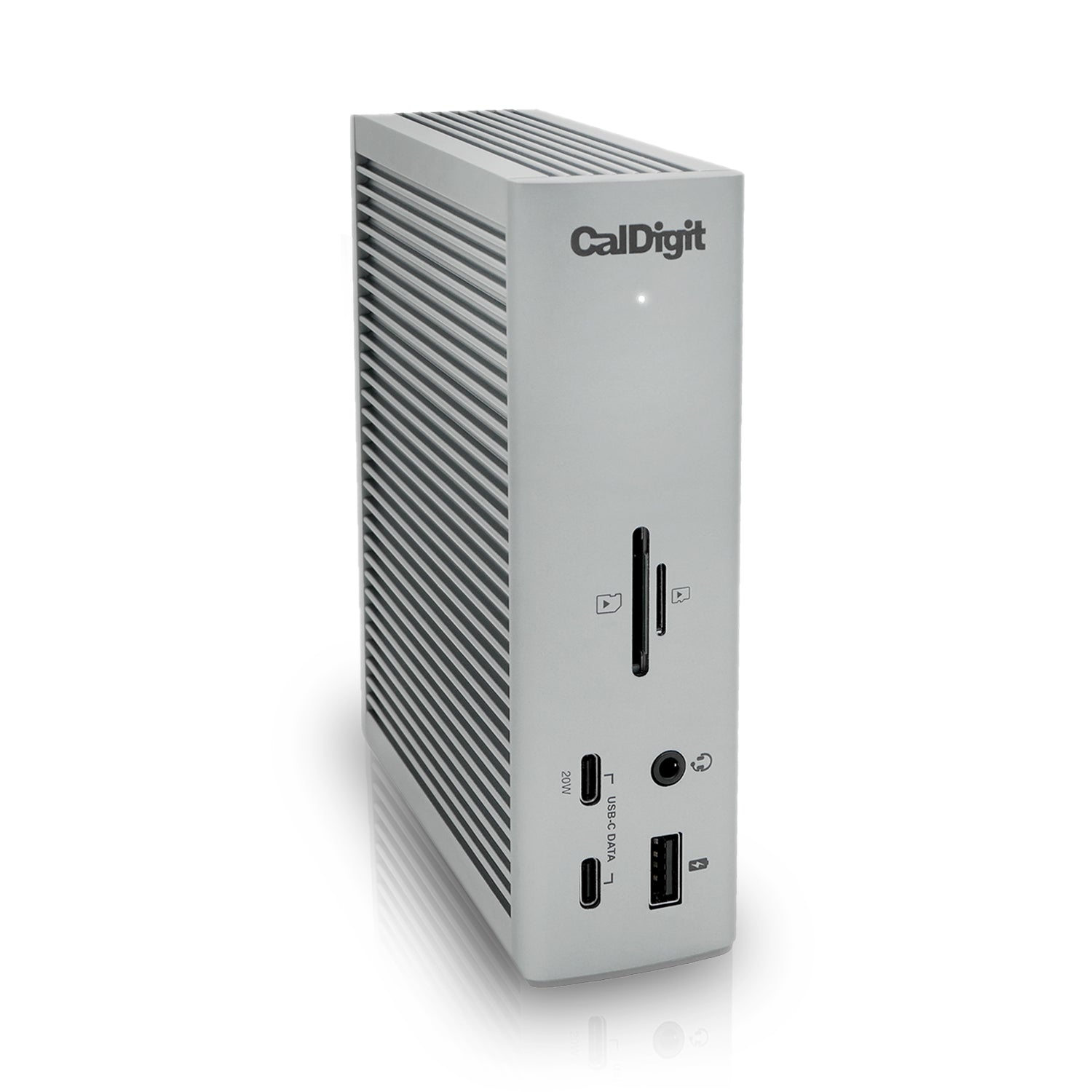
CalDigit TS4
A long-standing Thunderbolt 4 favorite that multiple testers keep returning to even after trying newer docks, valued for consistent day-to-day reliability at a lower price than CalDigit’s TS5 line.
- 18 ports covering USB-A/C, DisplayPort, Ethernet and dual card readers
- Can be run vertically or horizontally, a design flexibility testers specifically praise
- Positioned by three independent professional sources as a reliable long-term daily driver
- Scores 90/100 on port selection and expandability, among the strongest dimensions evaluated for this product
- 98W host charging trails the Thunderbolt 5 flagships in this shortlist
- Exact current price not independently reconfirmed this pass
- No 10GbE, unlike CalDigit’s newer TS5 Plus
A long-standing favorite across multiple independent testers who keep returning to it even after trying newer Thunderbolt 5 docks, valued for consistent day-to-day reliability at a lower price than CalDigit’s TS5 line.
Independent testers repeatedly returned to the TS4 after evaluating newer docks, citing its broad port selection, dependable day-to-day performance and flexible vertical or horizontal orientation.
No independent long-term failure-rate data was found this pass, but the consistent theme across three independent testers is that this dock has proven itself as a dependable long-term daily driver relative to newer competitors.
- Buyers who already own a Thunderbolt 5 laptop and want to make full use of its bandwidth.
| Connection Standard | Thunderbolt 4, 40Gbps |
|---|---|
| Power Delivery To Host | 98W host charging (per widely reported spec) |
| Port Count And Mix | 18 ports total including USB-A, USB-C, DisplayPort, Ethernet, SD/microSD, audio |
| Max Display Support | Dual 4K@60Hz or single 8K on supporting hosts |
| Form Factor | Can be oriented either vertically or horizontally |

Wavlink Thunderbolt 5 Thunderlight
A value-focused Thunderbolt 5 dock that matches the category’s 140W charging tier at a lower price than the CalDigit and Anker flagships. Independent testing supports its speed and build quality, while the lack of native video output and uncertain warranty term are the main trade-offs.
- 140W host charging matches the category’s top tier at a fraction of flagship pricing ($299.99, often $239.99 with an Amazon coupon)
- 12-in-1 ports including SD/microSD, lock slots and 2.5GbE, confirmed across three independent reviews
- Praised design and build quality with active cooling
- Scores 90/100 on power delivery to laptop, among the strongest dimensions evaluated for this product
- No native HDMI or DisplayPort output — needs a Thunderbolt-to-display cable or adapter
- One-year warranty, shorter than the two-year terms on several premium rivals
- No M.2 SSD slot or Thunderbolt Share support
It ranks as the value-focused Thunderbolt 5 option, matching the category’s 140W charging tier at a lower price than the CalDigit and Anker flagships. The main compromise is the lack of native HDMI or DisplayPort, so external displays require Thunderbolt-compatible adapters or cables.
Independent testing supports the build quality, Thunderbolt 3/USB4 backward compatibility and dual 6K/60Hz display support on most M1–M5 Pro/Max MacBooks. The consistent omission is native video output, so an appropriate Thunderbolt display cable or adapter is required.
No safe numeric owner-review aggregate was available. Warranty information is inconsistent: the retail listing states two years while separate product material states one year, so the shorter term should be assumed until the manufacturer confirms otherwise.
- No native HDMI or DisplayPort output — needs a Thunderbolt-to-display cable or adapter
- One-year warranty, shorter than the two-year terms on several premium rivals
- No M.2 SSD slot or Thunderbolt Share support
| Connection Standard | Thunderbolt 5 |
|---|---|
| Power Delivery To Host | Up to 140W of host-laptop charging |
| Port Count And Mix | 12-in-1 ports including SD/microSD slots, lock slot and 2.5GbE; no M.2 SSD slot |
| Max Display Support | Single 8K/60Hz via Thunderbolt 5; dual 6K/60Hz on most M1–M5 Pro/Max MacBooks; no native HDMI or DisplayPort, so an adapter or compatible cable is required |
| Warranty Term | Warranty term is inconsistent across product and retail materials: one year versus two years; assume one year until confirmed |
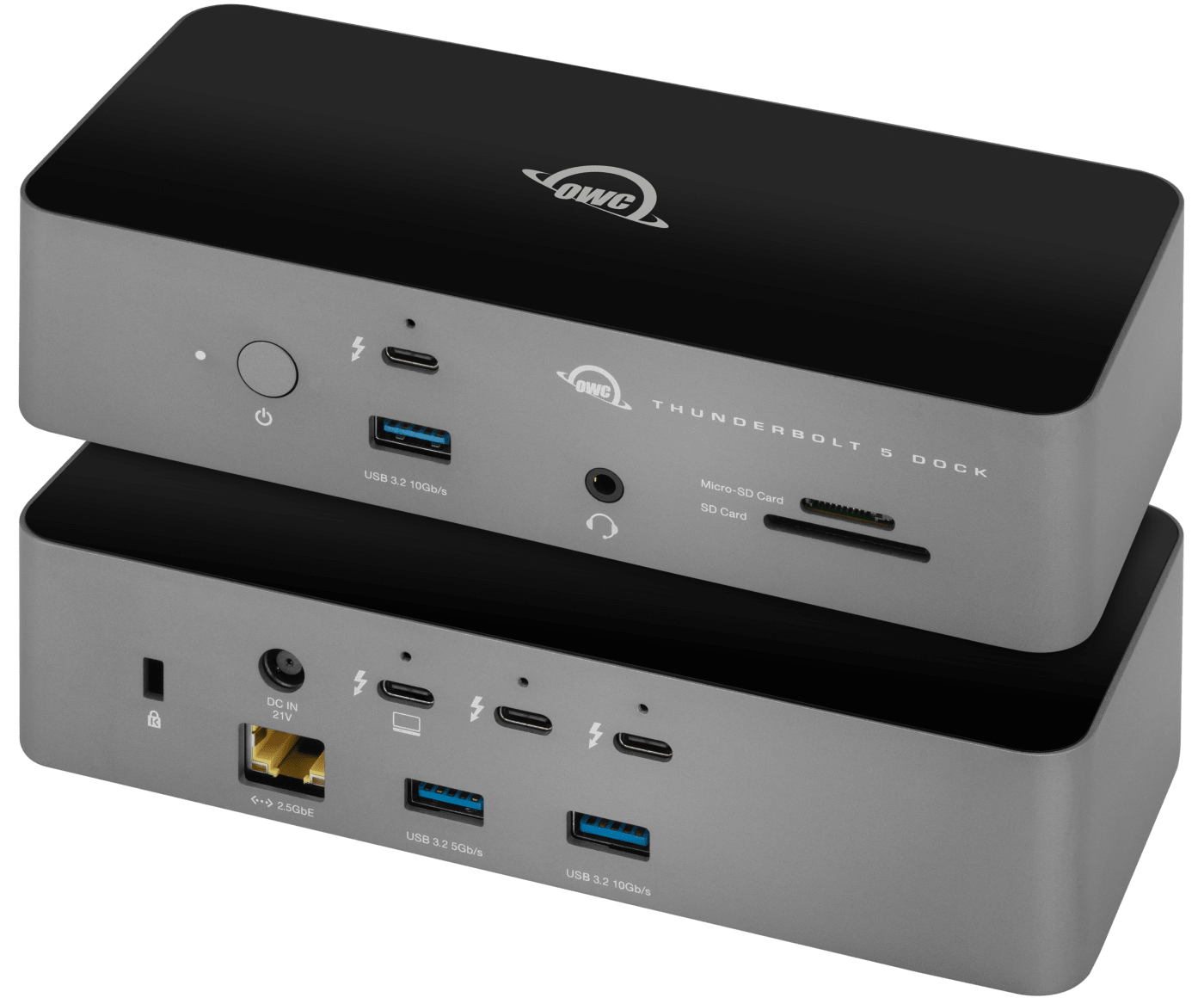
OWC Thunderbolt 5 Dock
A well-balanced Thunderbolt 5 desk dock for MacBook users, covering the essential card, network, legacy USB, audio and charging connections while undercutting the CalDigit TS5 Plus on price.
- Balanced all-around Thunderbolt 5 connectivity for most MacBook users
- Card readers, Ethernet, USB-A and audio in a full desk-dock configuration
- Priced below the CalDigit TS5 Plus in the captured price comparison ($329 versus $499.99)
- Scores 84/100 on connectivity speed and reliability, among the strongest dimensions evaluated for this product
- Only 2 independent sources found — below the category’s 3-source target
- Exact port count and charging wattage not independently captured from an OWC official spec page
- Captured price was not confirmed on OWC’s own product page
It ranks here as a balanced general-purpose Thunderbolt 5 dock for MacBook users, covering the core port and charging needs while undercutting the CalDigit TS5 Plus on price.
The documented port mix covers card readers, Ethernet, USB-A for older peripherals, audio and multiple charging connections, making it a practical single-box solution for reducing MacBook desk clutter.
No independent long-term reliability data or numeric owner-review aggregate was found this pass. OWC has a long-standing general reputation in the Mac accessory space, though this was not independently verified through testing in the sources found.
- Buyers who specifically need multiple simultaneous high-speed network connections — OWC positions a separate 10GbE dual-network dock variant for that use case.
| Connection Standard | Thunderbolt 5 |
|---|---|
| Port Count And Mix | Card readers, Ethernet, USB-A for older peripherals, audio and multiple charging ports |
| Target Use Case | General-purpose desk-clutter reduction for MacBook users |

Plugable Thunderbolt 4 Dock (TBT4-UD5)
The most consistently cited mid-tier Thunderbolt 4 pick, backed by a genuine 90-day daily-driver test showing stable multi-peripheral, multi-display use without dropouts.
- 13 ports including dual HDMI, Ethernet, SD/microSD and front TB4 passthrough
- Verified 90-day daily-use test with no dropouts under sustained CPU/GPU load
- Intel Evo certified and supported by a 90-day stability test
- Scores 85/100 on connectivity speed and reliability, among the strongest dimensions evaluated for this product
- Dual 4K@60Hz via HDMI only — no native DisplayPort output
- 100W (96W certified) trails the Thunderbolt 5 flagships
- Exact current retail price not independently reconfirmed this pass
The most consistently cited mid-tier Thunderbolt 4 pick across independent testers, backed by a genuine 90-day daily-driver test showing stable multi-peripheral, multi-display use without dropouts.
An independent 90-day daily-driver test found the dock handled a Dell XPS 15 with an external SSD, two monitors, keyboard, mouse and audio interface simultaneously without issue, including holding 100% battery through a sustained Cinebench R24 workload.
- Sustained CPU/GPU load charging: Laptop held 100% battery through a Cinebench R24 run while docked, per the reviewer’s own test.
No numeric owner-review aggregate was independently re-confirmed this pass, but the widely cited industry-award pedigree and the 90-day stability test are consistent, positive reliability signals.
- Buyers who specifically need native DisplayPort output or Thunderbolt 5 bandwidth.
| Connection Standard | Thunderbolt 4, 40Gbps, Intel Evo certified |
|---|---|
| Power Delivery To Host | 100W max (96W certified) |
| Port Count And Mix | 13 total ports: dual HDMI 2.0, 4x USB-A 3.0, Gigabit Ethernet, SD/microSD, front TB4 passthrough, 3.5mm audio |
| Max Display Support | Dual 4K@60Hz via HDMI, or single 8K on Thunderbolt 4 laptops |
| Certifications | Thunderbolt 4 certified, Intel Evo certified |
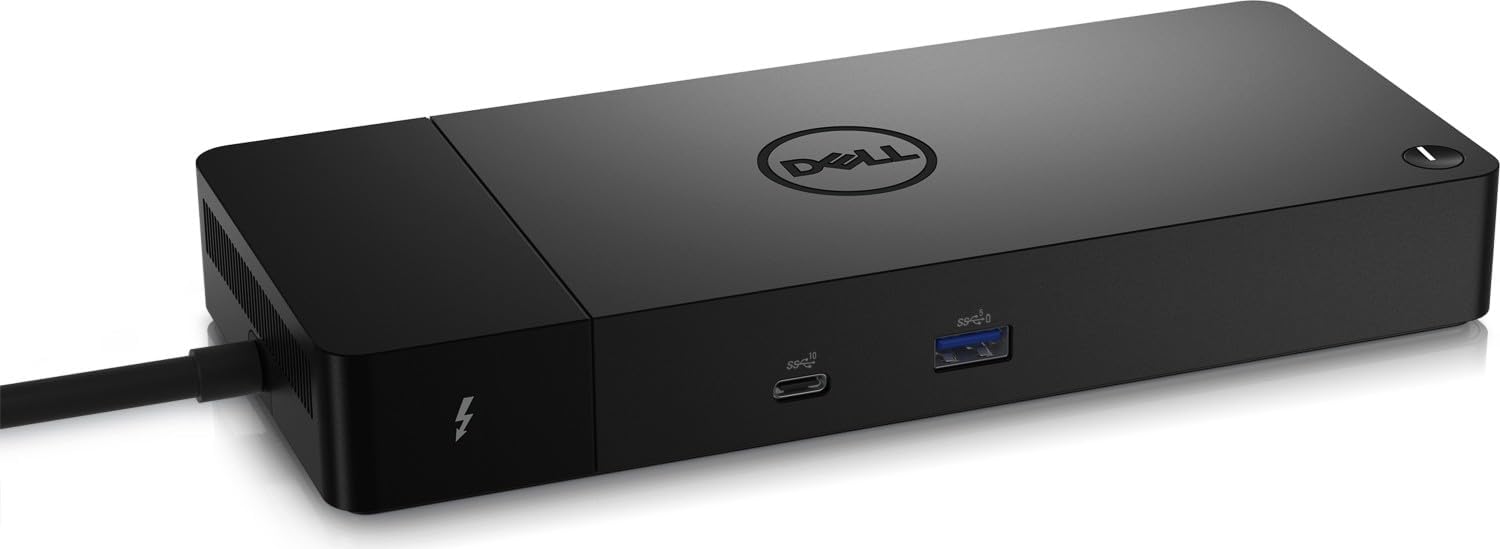
Dell Thunderbolt Dock WD22TB4
Dell’s current-generation Thunderbolt 4 dock, well documented directly from Dell’s own spec sheet, with power delivery, port list and security-slot detail confirmed — though its full 130W charging tier is reserved for Dell’s own laptops.
- Broad official port list: dual TB4, dual DisplayPort, HDMI, dual USB-A, front-panel PowerShare and Ethernet
- Both Noble Wedge and Kensington physical security-lock slots for office deployment
- One detailed owner account reports stable mixed Mac M1/Windows daily use with no USB dropouts
- Scores 88/100 on power delivery to laptop, among the strongest dimensions evaluated for this product
- Current Dell.com list price not captured verbatim this pass
- Scores 68/100 on platform compatibility, lower than this product’s other evaluated dimensions
- Scores 75/100 on build quality and thermal reliability, lower than this product’s other evaluated dimensions
Dell’s own current-generation Thunderbolt 4 dock, with power delivery, port list and security-slot detail confirmed directly from Dell’s official spec sheet and support documentation, though its highest 130W charging tier is reserved for Dell’s own laptops.
Dell’s documentation confirms 130W ExpressCharge delivery to compatible Dell systems and support for up to four external screens, including two 4K/60Hz displays or three FHD displays.
Dell provides official firmware-update and troubleshooting documentation. One retailer-page owner account specifically reports stable mixed-platform daily use without USB dropouts, contrasted against a prior negative experience with an unnamed other-brand hub, though no formal aggregate rating was found.
- Current Dell.com list price not captured verbatim this pass
- Scores 68/100 on platform compatibility, lower than this product’s other evaluated dimensions.
- Scores 75/100 on build quality and thermal reliability, lower than this product’s other evaluated dimensions.
| Connection Standard | Thunderbolt 4 (Type-C) |
|---|---|
| Power Delivery To Host | 130W to Dell systems (ExpressCharge/ExpressCharge Boost), 90W to non-Dell systems |
| Port Count And Mix | 2x Thunderbolt 4, 2x DisplayPort 1.4, 1x HDMI, 1x USB-C 3.2 Gen2 with DP Alt Mode, 2x USB-A 3.2, front USB-C 3.2 Gen2 + USB-A 3.2 Gen1 with PowerShare, RJ-45 Ethernet, Noble Wedge + Kensington security slots |
| Max Display Support | Up to four external screens including two 4K@60Hz or three FHD displays |
| OS Support | Windows 10, Windows 11, Ubuntu 20.04+ |
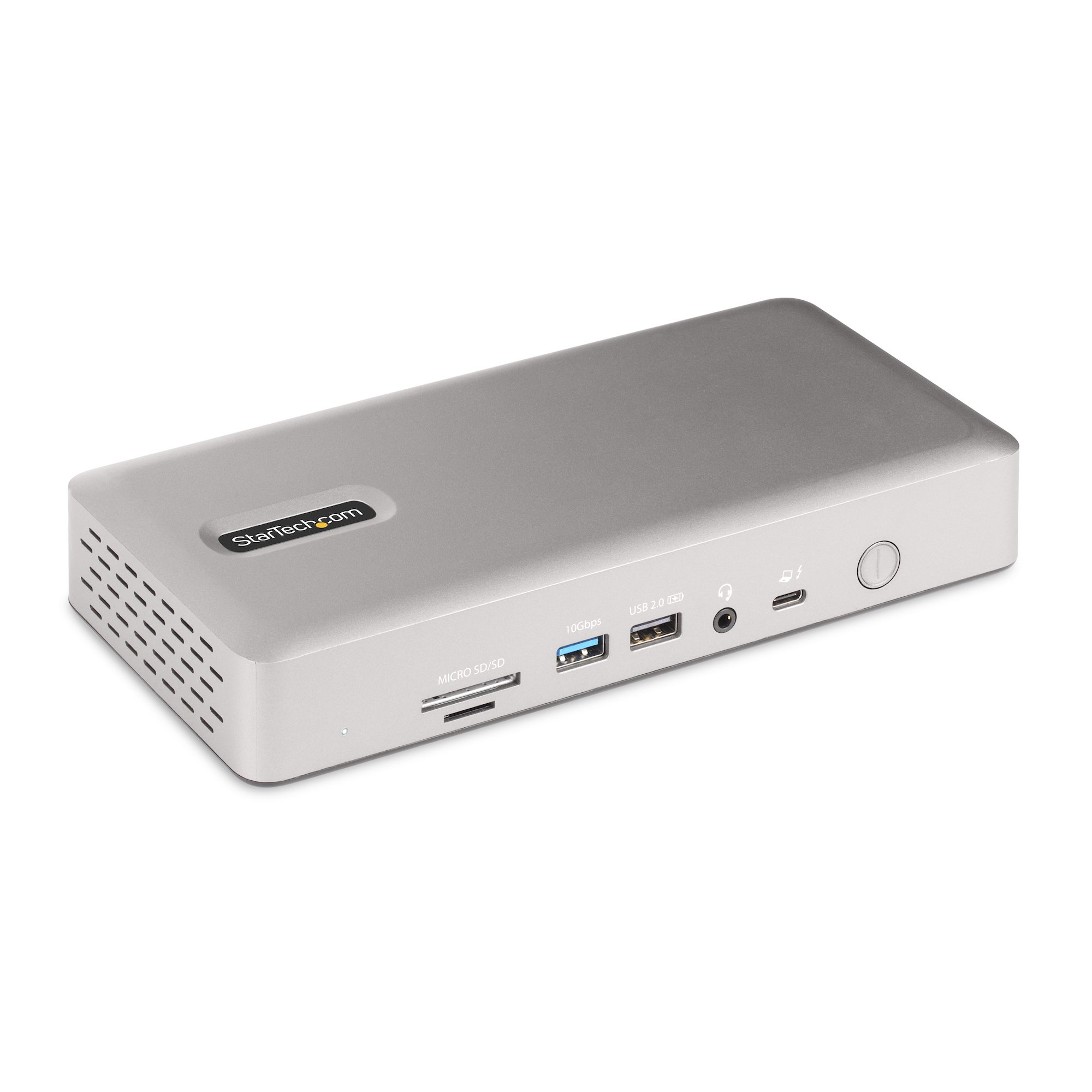
StarTech.com Thunderbolt 4/USB4 Quad Display Docking Station
The clearest choice for buyers who most need to drive four external displays, trading away all downstream Thunderbolt ports to do it — now backed by three independent reviews confirming reliable dual/quad-display operation.
- Up to four 4K60 displays with the right host hardware — the widest display support in this shortlist
- UHS-II SD card reader (312MBps), faster than many rivals’ UHS-I readers
- Dual display-port groups (DisplayPort+HDMI each) avoid forcing buyers into a specific cable
- Scores 90/100 on display and multi monitor support, among the strongest dimensions evaluated for this product
- Zero downstream Thunderbolt/USB4 ports — all bandwidth goes to display support
- Only 1 USB-C port versus 6 USB-A ports, a dated port mix by 2026 standards
- Exact current price and power-delivery wattage not independently reconfirmed this pass
It earns a place for buyers who prioritise four external displays over compactness or downstream Thunderbolt expansion. That unusually broad display support outweighs its dated USB mix and limited independent long-term evidence.
Independent testing reports stable operation with dual monitors, accessories, Ethernet and charging. Separate tests confirm the quad-display and dual-4K feature set, with flexible DisplayPort and HDMI groupings that avoid locking buyers into one cable standard.
No independent long-term reliability data or numeric owner-review aggregate was found this pass, though none of the three independent reviews reported stability complaints.
- Zero downstream Thunderbolt/USB4 ports — all bandwidth goes to display support
- Only 1 USB-C port versus 6 USB-A ports, a dated port mix by 2026 standards
- Exact current price and power-delivery wattage not independently reconfirmed this pass
| Connection Standard | Thunderbolt 4 / USB4 |
|---|---|
| Max Display Support | Quad external display support on compatible host hardware |
| Target Use Case | Buyers who prioritize multiple external displays over compactness |
How We Evaluate Docking Stations
Our rankings are built through the Flickthru CORE™ Market Research Engine, which first analyses the category, its intended buyers, and the current US market. Products are then assessed using category-specific evidence, performance indicators, availability, ownership signals, and long-term reliability considerations.
Recommendations reflect overall suitability for the intended buyer – not simply the highest specification, lowest price, or strongest result in a single test. When product-level customer feedback is limited, we prioritize official validation, credible technical evidence, and demonstrated category suitability rather than estimating or inflating review counts. Read the full Flickthru product ranking methodology.
- Category Specific Analysis: Defining buyers’ needs, primary uses, business priorities, acceptable compromises, and category-specific requirements before products are compared.
- Long-Term Reliability: Tracking recurring failure patterns, component durability, warranty trends, and long-term ownership outcomes from verified market data.
- Performance: Evaluating category-specific real-world performance, efficiency, consistency, and practical usability rather than relying on marketing claims alone.
- Features: Assessing functionality, usability, build quality, safety, ergonomics, and category-specific capabilities important to long-term ownership.
- Value: Measuring total cost of ownership, lifecycle longevity, support quality, lifecycle suitability, and overall return on investment.
- Evidence Review: Combining verified purchaser feedback where available with professional testing, official product validation, technical evidence, and market suitability signals.
- Market Coverage: Mapping the current US market, credible product families, availability, price positioning, and relevant competitors within the category.
Products demonstrating recurring reliability concerns, inconsistent performance behavior, poor ownership outcomes, or widespread negative sentiment are algorithmically suppressed from our rankings regardless of marketing claims, sponsorship relationships, or short-term popularity trends.
This methodology is designed to identify products that deliver genuine long-term value, reliability, and real-world usefulness rather than simply matching short-term hype, advertising claims, or isolated test results.