
Best Budget Business Laptops 2026
A category-specific approach to ranking Budget Business Laptops
Most general product roundups are built around broad buyer priorities. Flickthru evaluates budget business laptops for US small businesses and self-employed professionals, prioritising business productivity fit, performance and multitasking, security manageability, reliability support, and value and total ownership cost.

Apple MacBook Air 13-inch (M5)
The strongest all-round ultraportable here when macOS is compatible with the buyer’s work.
- Excellent office performance in a silent fanless design
- Class-leading mobility and independently verified battery life
- High-quality display, keyboard, trackpad, camera and speakers
- 16GB memory and 512GB storage in the qualifying base model
- Only two USB-C/Thunderbolt ports and no USB-A
- Memory and storage cannot be upgraded after purchase
- macOS may not suit Windows-only accounting, VPN or management tools
- Independent professionals, students and small-business buyers who value battery life, quiet operation and premium everyday usability.
- Organizations tied to Windows-only software, broad wired connectivity or field-upgradeable memory and storage.
It wins the four-way 87-point tie through the field’s best usability score, class-leading performance for its size and independently verified endurance. The qualifying 16GB/512GB base configuration also avoids the compromises common at this price. Two ports, fixed upgrades and macOS compatibility limit business flexibility, but for compatible buyers it is the most polished and complete budget option.
Independent testing indicates 10–20% performance gains over M4, up to about 17 hours light use and around 10 hours intensive use, while noting only two USB-C ports.
- Measured result: Independent testing recorded Geekbench 6 scores of 4,190 single-core and 17,073 multi-core, plus 15.5 hours in a web-surfing battery test; the base 8-core GPU can differ.
| Processor | Apple M5 10-core CPU |
|---|---|
| Memory | 16GB unified memory |
| Storage | 512GB SSD |
| Display | 13.6-inch Liquid Retina |
| Security | Secure Enclave, Touch ID and current macOS security |
| Ports | MagSafe, two Thunderbolt/USB-C ports and headphone jack |
| Operating System | macOS |
| Current Price | $1,099 |

ASUS ExpertBook P3 PM3406
A highly capable budget-business choice when the exact 16GB configuration and price are checked carefully.
- Strong Ryzen AI productivity performance
- Long measured battery life
- Business-friendly ports, security features and upgrade options
- Comfortable keyboard and practical 16:10 workspace
- Display color coverage is limited
- Some reviewed higher-spec configurations exceed the category ceiling
- Single-channel memory configurations can reduce performance
- Small businesses wanting a modern Windows business laptop with long endurance and strong connectivity.
- Color-critical work or buyers who cannot verify that the chosen memory configuration is dual-channel.
Second place combines the highest value score in the leading group with modern Ryzen AI performance, long battery life, practical ports and upgrade options. It is the strongest conventional Windows alternative to the MacBook Air. It loses the top tie-break because display color is limited, some configurations exceed the price ceiling and single-channel memory can materially reduce expected performance.
Independent testing indicates a sturdy aluminum case, sufficient ports, good input devices, good Ryzen AI 7 performance and long battery life.
- Measured result: Independent testing measured 768 minutes, about 12.8 hours, in its battery benchmark and found the 70Wh battery a strong fit for mobile office work.
| Processor | AMD Ryzen AI options including Ryzen AI 7 350 |
|---|---|
| Memory | 16GB or higher; upgrade path depends on configuration |
| Storage | NVMe SSD |
| Display | 14-inch business display |
| Security | Business security features and camera privacy |
| Ports | Two USB-C, two USB-A, HDMI 2.1, audio and Gigabit Ethernet |
| Operating System | Windows 11 |

Lenovo ThinkPad E14 Gen 7 (Intel)
A strong compact business platform, but its Intel variants must be treated as materially different purchases.
- Excellent keyboard and business-friendly ports
- Strong security and support positioning
- Optional 120Hz display improves daily usability
- Choice of efficient Lunar Lake or more serviceable Arrow Lake platforms
- Processor choice materially changes performance, endurance and upgradeability
- 48Wh configurations have limited battery capacity
- Small businesses wanting ThinkPad ergonomics and connectivity in a compact, affordable system.
- Buyers who want a simple one-configuration recommendation without checking processor, battery and display options.
Third place rewards the highest business-productivity score among the leaders, backed by excellent ThinkPad inputs, ports, security and support. It trails the ASUS in the 87-point tie because value and raw performance are slightly lower, while the processor choice changes endurance, speed and upgradeability enough to complicate buying. The right Intel configuration remains an excellent compact fleet choice.
Independent testing found the E14 Gen 7 a strong office laptop with an excellent keyboard, useful ports and strong performance; the tested AMD variant was less efficient than the Intel sibling.
| Processor | Intel Core Ultra family |
|---|---|
| Memory | 16GB or higher qualifying configuration |
| Storage | NVMe SSD |
| Display | 14-inch 16:10 |
| Security | TPM/Windows security with optional fingerprint/IR by configuration |
| Ports | USB-C/Thunderbolt, USB-A, HDMI and Ethernet options |
| Operating System | Windows 11 |

Lenovo ThinkPad E16 Gen 3 (Intel)
A high-value large-screen business laptop whose best qualities depend on choosing the right battery and display.
- Excellent keyboard and spacious 16-inch workspace
- Strong port selection including Ethernet
- Very good measured endurance with the larger battery
- High memory ceiling and useful upgrade options
- Battery results depend heavily on the selected 48Wh or 64Wh battery
- Entry-level display options are less impressive than the optional 120Hz panel
- The retained owner listing is an AMD variant, not the scored Intel configuration
- Desk-based and hybrid workers wanting a large screen, excellent typing experience and business connectivity.
- Frequent travelers seeking the lightest system or buyers who cannot confirm the battery and display option.
It finishes the 87-point group as the best large-screen option, with a spacious workspace, Ethernet, strong reliability and meaningful memory expansion. Its larger-battery configuration can deliver very good endurance, but the 48Wh version and entry display weaken the proposition. Lower performance and greater travel burden make it less broadly useful than the three more compact leaders.
Independent testing found a revised aluminum chassis, good stability and no major office-laptop weakness at the price.
- Measured result: independent lab testing of the Intel model recorded 11.25 hours under light web use and 9 hours in a second battery test.
| Processor | Intel Core Ultra family |
|---|---|
| Memory | 16GB or higher qualifying configuration |
| Storage | NVMe SSD |
| Display | 16-inch 16:10 with 120Hz option |
| Security | TPM with optional fingerprint/IR |
| Ports | USB-C/Thunderbolt, USB-A, HDMI and Ethernet |
| Operating System | Windows 11 |
| Current Price | $963.30 |

HP ProBook 440 G11
A sensible compact workhorse with stronger business controls than most consumer laptops at the same price.
- Compact business chassis with a comfortable keyboard
- Strong security and manageability for the price
- Upgradeable memory and broad port selection
- Qualifying 16GB configurations can offer excellent value
- Only one M.2 storage slot
- Display quality varies by panel option
- Exact current street price varies sharply by configuration
- Small firms wanting traditional Windows business features in a portable 14-inch format.
- Buyers prioritizing a premium display or unusually long independent battery results.
Fifth place is driven by the page’s best value score and strong security and manageability, giving small firms genuine business features without flagship pricing. Upgradeable memory, broad ports and comfortable daily use reinforce that case. It sits one point below the leaders because performance is modest, display quality varies and rapidly changing configuration prices make the best deal harder to identify.
Independent testing indicates long battery life, adequate performance, good portability and comfortable everyday use.
| Processor | Intel Core Ultra options |
|---|---|
| Memory | 16GB qualifying configuration |
| Storage | 512GB SSD representative |
| Display | 14-inch 16:10 WUXGA options |
| Security | HP business security/Wolf Security features |
| Ports | USB-C, USB-A, HDMI and business connectivity |
| Operating System | Windows 11 |
| Current Price | $749 |
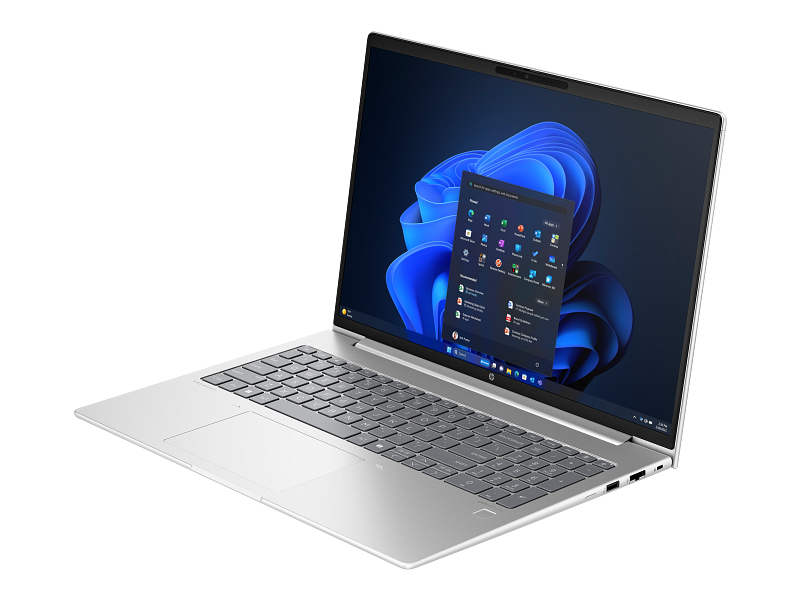
HP ProBook 460 G11
A practical big-screen business machine that trades portability and display flair for serviceability and everyday comfort.
- Large 16-inch workspace and comfortable keyboard
- Quiet cooling with adequate sustained office performance
- Business security, Ethernet and upgradeable memory
- Strong value when a qualifying configuration is below $1,200
- Heavier and less convenient for frequent commuting
- Base display options emphasize utility rather than color quality
- Office-based buyers who want a large Windows business laptop with a number pad and conventional ports.
- Frequent travelers or creative users who need a brighter, wider-gamut display.
It leads the 85-point pair through its large 16-inch workspace, comfortable keyboard, quiet cooling and business-friendly Ethernet and memory access. Those strengths suit office-based buyers more than commuters. It remains below the compact ProBook 440 because value, reliability and portability are weaker, while base displays prioritize utility over visual quality.
Independent testing indicates responsive performance, a good keyboard, long battery life and quiet cooling under load.
| Processor | Intel Core Ultra 5/7 options |
|---|---|
| Memory | 16GB qualifying configuration |
| Storage | 512GB SSD representative |
| Display | 16-inch WUXGA |
| Security | HP business security features |
| Ports | USB-C, USB-A, HDMI and business connectivity |
| Operating System | Windows 11 |

Dell Pro 14
A sensible entry business laptop with the right connectivity and serviceability, provided the configuration stays below the budget ceiling.
- Business-oriented port selection including Ethernet
- Upgradeable memory and practical modular design
- Nearly 11 hours in exact-model battery testing
- Current Dell support and service route
- Plastic chassis feels less premium than some rivals
- Display options prioritize office utility over color quality
- Small-business Windows deployments needing conventional ports, upgradeability and a mainstream support channel.
- Buyers prioritizing premium materials, a vivid display or extensive independent test coverage.
Seventh place reflects a practical business foundation: Ethernet, upgradeable memory, modular construction, current Dell service and nearly 11 hours of exact-model battery testing. It ties the larger ProBook at 85 but ranks lower on usability and offers a less premium chassis and display. Its recommendation also depends on keeping the selected configuration below the category’s price ceiling.
A current product assessment highlights 16GB RAM, broad ports, military-grade durability claims and a sub-$1,000 deal configuration.
| Processor | Intel Core 7 or Core Ultra 5/7 options |
|---|---|
| Memory | 16GB DDR5 representative |
| Storage | 512GB SSD representative |
| Display | 14-inch 1920×1200 |
| Security | Windows 11 Pro and business security options |
| Ports | Thunderbolt 4/USB-C, USB-A, HDMI 2.1 and Ethernet |
| Operating System | Windows 11 |
| Current Price | $959 |

Dell 14 Plus
One of the best-value consumer alternatives for office work, though it lacks the support depth of a true business line.
- Strong value and smooth everyday productivity
- Long battery life across several independent tests
- Useful USB-C, USB-A and HDMI connectivity
- Solid construction for a consumer-class alternative
- Display is dimmer and duller than leading rivals
- Consumer manageability and support options trail business lines
- Webcam, speakers and keyboard receive mixed assessments
- Individuals and very small teams seeking a capable long-lasting Windows laptop at a strong street price.
- Managed fleets or users who need a bright, color-rich display and enterprise service options.
Eighth place rewards exceptional 93-rated value, long battery life and capable everyday performance around the strongest deal prices. It ranks below true business models because security, manageability and support are materially weaker, while the display and collaboration hardware receive mixed assessments. It is best for individuals and very small teams that can accept consumer-class lifecycle support.
Review aggregation characterizes the 14 Plus as a sturdy, well-designed value laptop with a sharp 2.5K display, particularly near $750.
- Measured result: Exact clamshell testing measured 13 hours 25 minutes of web browsing, while finding the 1600p display comparatively dim and dull.
| Processor | Intel Core Ultra V-series options |
|---|---|
| Memory | 16GB representative |
| Storage | 512GB SSD representative |
| Display | 14-inch 2.5K |
| Security | Fingerprint reader and Windows hardware security |
| Ports | Thunderbolt 4, HDMI 2.1 and USB-A/USB-C mix |
| Operating System | Windows 11 |
| Current Price | $750 |

HP OmniBook 5 14 (Snapdragon)
The battery-life value standout, but only for buyers who verify Windows-on-Arm compatibility first.
- Exceptional independently measured battery life
- OLED display at a budget-friendly price
- Thin and light design
- Strong everyday value for native Arm productivity apps
- Windows-on-Arm compatibility must be checked
- Weak graphics and heavy-workload performance
- Limited ports and consumer manageability
- Mobile students and independent workers using Microsoft 365, browsers and other Arm-compatible applications.
- Buyers dependent on legacy Windows software, specialist drivers, peripherals or demanding graphics.
Ninth place pairs the joint-highest value score with exceptional battery life, an OLED display and a thin, light chassis at a budget price. The ranking discounts those advantages because Windows-on-Arm compatibility must be verified, heavier workloads are slower and ports and business management are limited. For browser-first work using native Arm applications, it can outperform its overall position.
WIRED calls the OmniBook 5 its best tested budget deal, highlighting Snapdragon X, 16GB, 512GB and a 14-inch OLED display while noting the touchpad is not a strength.
- Measured result: Independent testing measured 28 hours 19 minutes in a PCMark Applications battery workload, while finding low multi-core rendering performance and compatibility limits.
| Processor | Snapdragon X / X Plus |
|---|---|
| Memory | 16GB |
| Storage | 512GB SSD |
| Display | 14-inch 2K OLED |
| Security | Windows 11 hardware-backed security/Copilot+ platform |
| Ports | Consumer ultrabook connectivity; verify dock and app compatibility |
| Operating System | Windows 11 |
-Product-04.jpg)
Acer Aspire 14 AI
A compelling battery-and-value choice once the Intel A14-52M identity is locked, but not a full business-class substitute.
- Excellent battery life in the exact Intel-platform test
- Strong value with 16GB memory and modern Core Ultra efficiency
- Portable 14-inch 16:10 design
- Good everyday productivity performance
- Average display and keyboard
- Soldered memory limits future upgrades
- Consumer build and support are less robust than business lines
- Students and independent workers prioritizing long battery life and low price over fleet features.
- Managed deployments, color-critical work or buyers who need upgradeable memory.
It finishes tenth because excellent endurance, modern efficiency and a 90 value score are offset by average inputs, soldered memory and consumer-grade support. The page’s evidence also spans different platform configurations, reducing confidence that every cited result applies to the exact Intel model. It remains attractive for basic independent work, but not as a direct replacement for a serviceable business line.
A 2026 test of a Ryzen/16GB/1TB configuration found strong value for students and small-business users.
| Processor | Intel Core Ultra Series 2 options |
|---|---|
| Memory | Up to 32GB LPDDR5X; 16GB representative |
| Storage | Up to 1TB SSD |
| Display | 14-inch 16:10 IPS/OLED options |
| Security | Windows Hello IR camera on supported configurations |
| Ports | Modern USB-C/USB-A/HDMI mix |
| Operating System | Windows 11 |
| Current Price | $749 |
How We Evaluate Budget Business Laptops
Our rankings are built through the Flickthru CORE™ Market Research Engine, which first analyses the category, its intended buyers, and the current US market. Products are then assessed using category-specific evidence, performance indicators, availability, ownership signals, and long-term reliability considerations.
Recommendations reflect overall suitability for the intended buyer—not simply the highest specification, lowest price, or strongest result in a single test. When product-level customer feedback is limited, we prioritize official validation, credible technical evidence, and demonstrated category suitability rather than estimating or inflating review counts. Read the full Flickthru product ranking methodology.
- Category Specific Analysis: Defining buyers’ needs, primary uses, business priorities, acceptable compromises, and category-specific requirements before products are compared.
- Long-Term Reliability: Tracking recurring failure patterns, component durability, warranty trends, and long-term ownership outcomes from verified market data.
- Performance: Evaluating category-specific real-world performance, efficiency, consistency, and practical usability rather than relying on marketing claims alone.
- Features: Assessing functionality, usability, build quality, safety, ergonomics, and category-specific capabilities important to long-term ownership.
- Value: Measuring total cost of ownership, lifecycle longevity, support quality, lifecycle suitability, and overall return on investment.
- Evidence Review: Combining verified purchaser feedback where available with professional testing, official product validation, technical evidence, and market suitability signals.
- Market Coverage: Mapping the current US market, credible product families, availability, price positioning, and relevant competitors within the category.
Products demonstrating recurring reliability concerns, inconsistent performance behavior, poor ownership outcomes, or widespread negative sentiment are algorithmically suppressed from our rankings regardless of marketing claims, sponsorship relationships, or short-term popularity trends.
This methodology is designed to identify products that deliver genuine long-term value, reliability, and real-world usefulness rather than simply matching short-term hype, advertising claims, or isolated test results.