Best Budget Monitors 2026

Rankings built with the Flickthru CORE™ Market Research Engine, official product validation, independent technical evidence, and human deployment review.
48Budget Monitor Families Assessed
65Evidence Sources Reviewed
10Ranked Budget Monitors

A category-specific approach to ranking Budget Monitors

Most general product roundups are built around broad buyer priorities. Flickthru evaluates budget monitors for buyers and professionals seeking an affordable monitor for office work, home working, study and everyday use. Identify the strongest budget options based on display quality, text clarity, connectivity, ergonomics, reliability and overall value, while avoiding false economy and unnecessary premium features, prioritising everyday display quality text clarity, value and price efficiency, connectivity and device fit, ergonomics and eye comfort, and workspace size and resolution fit.

89 CORE SCORE
🏆 Rank 1
Dell 27 Plus 4K USB-C Monitor S2725QC

Dell 27 Plus 4K USB-C Monitor S2725QC

Best Overall Budget Monitor

The best-balanced budget 4K choice for laptop users who value sharp text, 120 Hz motion and one-cable USB-C.

Home-office and hybrid workers using a USB-C laptop
Resolution3840 x 2160
Refresh rate120
Size27-inch
PanelIPS
Everyday Display Quality Text Clarity93
Value And Price Efficiency89
Connectivity And Device Fit90
Ergonomics And Eye Comfort91
Workspace Size And Resolution Fit93
Mixed Use Performance84
Pros
  • Sharp 27-inch 4K desktop
  • 120 Hz makes everyday motion smoother
  • 65W USB-C and downstream USB hub
  • Fully adjustable stand
Cons
  • HDR is not a meaningful strength
  • Motion response is slower than the refresh rate suggests
  • Costs more than the otherwise similar S2725QS
Best for
  • Home-office and hybrid workers using a USB-C laptop
Not ideal for
  • Fast competitive gaming or buyers who do not need USB-C
Why it ranked

S2725QC takes the top spot because it’s the only monitor in this list combining sharp 4K text, a 120Hz refresh rate, and one-cable USB-C laptop charging all at once — the plain S2725QS right behind it matches its panel and refresh rate but drops USB-C, which is exactly why laptop-first buyers should pay the difference for this one.

Performance evidence

Its 3840×2160 IPS panel delivers sharp text at 27 inches, and the 120Hz refresh rate makes everyday desktop motion noticeably smoother than the 60Hz budget monitors in this list — though motion response itself is slower than the refresh rate alone would suggest, and HDR isn’t a meaningful strength. The 65W USB-C input with a downstream USB hub is a genuine convenience for laptop users.

Reliability and support

A current Dell US store and support route are available. Evidence scarcity for this specific model lowers confidence rather than merit.

Key specifications
Size27-inch
Resolution3840 x 2160
PanelIPS
Refresh Rate Hz120
ConnectivityUSB-C 65W, two HDMI 2.1 and USB hub
ErgonomicsHeight, tilt, swivel and pivot
88 CORE SCORE
🥈 Rank 2
ASUS ProArt Display PA278CV

ASUS ProArt Display PA278CV

A mature, accurate QHD productivity monitor whose USB-C, daisy chaining and excellent stand remain useful at the right price.

Budget-conscious creators and color-sensitive…
Resolution2560 x 1440
Refresh rate75
Size27-inch
PanelIPS
Everyday Display Quality Text Clarity91
Value And Price Efficiency86
Connectivity And Device Fit93
Ergonomics And Eye Comfort93
Workspace Size And Resolution Fit90
Mixed Use Performance72
Pros
  • Excellent factory color accuracy
  • Sharp QHD text and wide viewing angles
  • 65W USB-C and DisplayPort daisy chaining
  • Excellent ergonomic stand
Cons
  • Only 75 Hz
  • Low IPS contrast and no HDR
  • Aging model with variable street value
Best for
  • Budget-conscious creators and color-sensitive office users
Not ideal for
  • High-refresh gaming or buyers who want modern HDR
Why it ranked

PA278CV ranks second on the strength of genuinely excellent factory color accuracy and USB-C daisy chaining, rare at this price — it loses the top spot mainly because its 75Hz refresh rate trails the 120Hz-plus panels ranked above and below it, a real limitation for anyone who wants smoother everyday motion.

Performance evidence

Factory color accuracy is genuinely excellent for a monitor at this price, backed by sharp 2560×1440 text and wide IPS viewing angles. USB-C with 65W charging and DisplayPort daisy chaining support multi-monitor setups cleanly, though the 75Hz refresh rate and low IPS contrast (with no HDR) are real limitations for buyers who want faster or higher-contrast image quality.

Reliability and support

A current ASUS support route is available, and this mature model has a longer independent review history than most in this list, supporting reasonably solid confidence despite variable current street pricing.

Key specifications
Size27-inch
Resolution2560 x 1440
PanelIPS
Refresh Rate Hz75
ConnectivityUSB-C 65W, HDMI, DisplayPort daisy chain and USB hub
ErgonomicsHeight, tilt, swivel and pivot
88 CORE SCORE
🥉 Rank 3
Dell 27 Plus 4K Monitor S2725QS

Dell 27 Plus 4K Monitor S2725QS

The strongest simple 4K value here for desktop users who do not need USB-C.
Desktop-PC users wanting affordable 4K productivity
Resolution3840 x 2160
Refresh rate120
Size27-inch
PanelIPS
Everyday Display Quality Text Clarity93
Value And Price Efficiency92
Connectivity And Device Fit75
Ergonomics And Eye Comfort91
Workspace Size And Resolution Fit93
Mixed Use Performance84
Pros
  • Excellent 27-inch 4K text sharpness
  • 120 Hz refresh and low input lag
  • Fully adjustable stand
  • Competitive current price
Cons
  • No USB-C or USB hub
  • Slow pixel response creates motion blur
  • Weak HDR and ordinary IPS contrast
Best for
  • Desktop-PC users wanting affordable 4K productivity
Not ideal for
  • One-cable laptop setups or motion-critical gaming
Why it ranked

S2725QS ranks third as the no-USB-C alternative to the S2725QC above it: same sharp 4K panel and 120Hz refresh rate at a lower price, but desktop-only connectivity (no laptop charging or hub) is the real trade-off that keeps it behind its USB-C sibling.

Performance evidence

The same sharp 3840×2160 panel and 120Hz refresh rate as the pricier S2725QC, with low input lag and a fully adjustable stand — but without USB-C, so there’s no laptop charging or downstream hub. Pixel response is slow enough to create visible motion blur, and HDR and contrast remain ordinary for an IPS panel.

Reliability and support

A current Dell US store and support route are available. Evidence scarcity for this specific model lowers confidence rather than merit.

Key specifications
Size27-inch
Resolution3840 x 2160
PanelIPS
Refresh Rate Hz120
ConnectivityTwo HDMI 2.1 and DisplayPort 1.4
ErgonomicsHeight, tilt, swivel and pivot
87 CORE SCORE
Rank 4
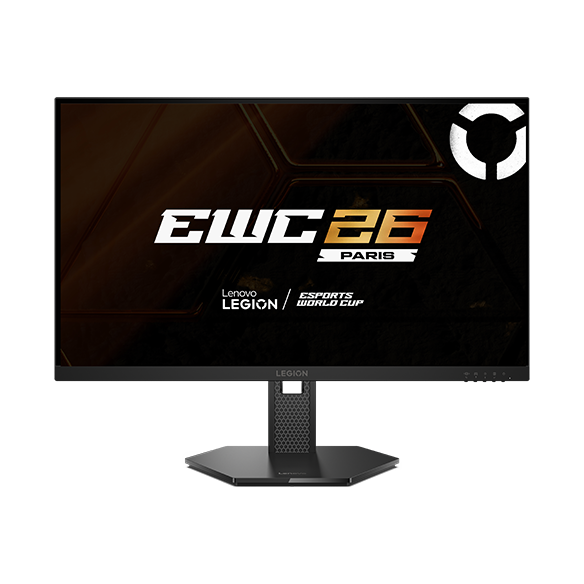
Lenovo Legion 27Q-10

Lenovo Legion 27Q-10

A standout QHD value when its US sale price holds, particularly for buyers who mix work with high-refresh gaming.

Value-focused buyers combining office work and…
Resolution2560 x 1440
Refresh rate240
Size27-inch
PanelIPS
Everyday Display Quality Text Clarity87
Value And Price Efficiency94
Connectivity And Device Fit73
Ergonomics And Eye Comfort90
Workspace Size And Resolution Fit88
Mixed Use Performance94
Pros
  • 27-inch QHD is a strong everyday size and resolution
  • 240 Hz refresh at an aggressive price
  • Factory-stated Delta E below 2
  • Height, swivel, pivot and tilt adjustment
Cons
  • No USB-C or USB hub
  • Professional test coverage is thinner than the Dell and AOC leaders
  • Sale pricing may move quickly
Best for
  • Value-focused buyers combining office work and fast gaming
Not ideal for
  • USB-C laptop docking or buyers wanting 4K text density
Why it ranked

Legion 27Q-10 ranks fourth for a genuinely distinct strength — 240Hz refresh at an aggressive sale price, the fastest panel in this list by far — but its professional test coverage is thinner than the Dell and AOC monitors ranked above and below it, and sale pricing isn’t guaranteed to hold.

Performance evidence

A 240Hz refresh rate at 2560×1440 makes this the fastest panel in this list by a wide margin, paired with a factory-stated Delta E below 2 for reasonably accurate color out of the box. Full height, swivel, pivot, and tilt adjustment round out the stand, though independent professional testing on this exact model remains thinner than the more established Dell and AOC monitors in this list.

Reliability and support

A current Lenovo US support route is available, though independent professional test coverage on this exact model remains thinner than the more established Dell and AOC monitors in this list.

Key specifications
Size27-inch
Resolution2560 x 1440
PanelIPS
Refresh Rate Hz240
ConnectivityTwo HDMI 2.1, DisplayPort 1.4 and audio out
ErgonomicsHeight, tilt, swivel and pivot
86 CORE SCORE
Rank 5
Dell 27 Plus QHD USB-C Monitor S2725DC

Dell 27 Plus QHD USB-C Monitor S2725DC

A practical QHD USB-C monitor that trades 4K density for 144 Hz smoothness and easier native scaling.

Laptop users wanting a smooth, uncomplicated QHD…
Resolution2560 x 1440
Refresh rate144
Size27-inch
PanelIPS
Everyday Display Quality Text Clarity88
Value And Price Efficiency85
Connectivity And Device Fit90
Ergonomics And Eye Comfort88
Workspace Size And Resolution Fit88
Mixed Use Performance85
Pros
  • QHD is comfortable at 27 inches
  • 144 Hz refresh
  • 65W USB-C and useful hub
  • Full ergonomic adjustment
Cons
  • Not as sharp as 27-inch 4K options
  • Lower resolution ceiling than the 27-inch 4K options in this list
  • No meaningful HDR capability
Best for
  • Laptop users wanting a smooth, uncomplicated QHD work display
Not ideal for
  • Buyers prioritizing maximum text density or measured HDR
Why it ranked

S2725DC ranks fifth as the QHD step down from the 4K Dell monitors above it: it trades some text sharpness for a smoother 144Hz refresh and easier native scaling, plus keeps USB-C charging — a real, sensible trade-off for buyers who don’t specifically need 4K density.

Performance evidence

A 144Hz refresh rate at 2560×1440 delivers smooth everyday motion with easier native scaling than a 4K panel, and 65W USB-C with a useful downstream hub keeps laptop connectivity simple. Text isn’t as sharp as the 4K options in this list, and HDR capability is not a meaningful strength here.

Reliability and support

A current Dell US store and support route are available. Evidence scarcity lowers confidence rather than merit.

Key specifications
Size27-inch
Resolution2560 x 1440
PanelIPS
Refresh Rate Hz144
ConnectivityUSB-C 65W, HDMI, DisplayPort and USB hub
ErgonomicsHeight, tilt, swivel and pivot
86 CORE SCORE
Rank 6
Dell Alienware Alienware AW2725DM product image

Dell Alienware Alienware AW2725DM

A well-supported QHD gaming monitor that is also comfortable for office work, though its HDR claims should not drive the purchase.

Buyers splitting time between productivity and PC…
Resolution2560 x 1440
Refresh rate180
Size27-inch
PanelFast IPS
Everyday Display Quality Text Clarity85
Value And Price Efficiency86
Connectivity And Device Fit78
Ergonomics And Eye Comfort90
Workspace Size And Resolution Fit87
Mixed Use Performance89
Pros
  • Sharp 27-inch QHD IPS display
  • 180 Hz and low input lag
  • Bright enough for most rooms
  • Excellent stand and three-year support
Cons
  • Poor HDR local dimming
  • More blur with VRR enabled
  • No USB-C laptop charging
Best for
  • Buyers splitting time between productivity and PC gaming
Not ideal for
  • USB-C offices or buyers seeking convincing HDR
Why it ranked

AW2725DM ranks sixth on the strength of a fast 180Hz panel and Dell’s three-year support, genuinely well-suited to buyers who split time between work and gaming — it sits below the higher-ranked monitors mainly because it drops USB-C laptop charging and its HDR claims don’t hold up to scrutiny.

Performance evidence

A fast IPS panel running at 180Hz with low input lag makes this a genuinely capable dual-purpose work-and-gaming display, backed by a bright panel suitable for most rooms and Dell’s three-year support. HDR local dimming is weak enough that its HDR claims shouldn’t drive a purchase decision, motion blur increases with VRR enabled, and there’s no USB-C laptop charging.

Reliability and support

Dell/Alienware backs this model with three-year support, one of the stronger warranty terms in this list, and a current US store and support route are available.

Key specifications
Size27-inch
Resolution2560 x 1440
PanelFast IPS
Refresh Rate Hz180
ConnectivityTwo HDMI, DisplayPort and USB hub
ErgonomicsHeight, tilt, swivel and pivot
85 CORE SCORE
Rank 7
LG UltraFine 27US550-W

LG UltraFine 27US550-W

An affordable 27-inch 4K IPS monitor from LG’s UltraFine line, aimed at office and study buyers who want sharp text without paying for USB-C or a fast refresh rate.

Office and study buyers prioritizing affordable 4K…
Resolution3840 x 2160
Refresh rate60
Size27-inch
PanelIPS
Everyday Display Quality Text Clarity90
Value And Price Efficiency92
Connectivity And Device Fit70
Ergonomics And Eye Comfort88
Workspace Size And Resolution Fit91
Mixed Use Performance70
Pros
  • Crisp 27-inch 4K image
  • IPS viewing consistency
  • Height, swivel, pivot and tilt adjustment
  • Competitive official US price
Cons
  • Only 60 Hz
  • No USB-C or USB hub
  • 60Hz is the slowest refresh rate of any 4K monitor in this list
Best for
  • Office and study buyers prioritizing affordable 4K clarity
Not ideal for
  • High-refresh gaming or one-cable laptop setups
Why it ranked

UltraFine 27US550-W ranks seventh as the most affordable way into 4K sharpness in this list, at a genuinely competitive official US price — but its 60Hz refresh rate and lack of USB-C are real limitations that keep it behind every higher-ranked monitor here, most of which offer at least one of those two things.

Performance evidence

A crisp 3840×2160 IPS image at a genuinely competitive official US price makes this the most affordable route to 4K sharpness in this list, with consistent IPS viewing angles and full height, swivel, pivot, and tilt adjustment. The 60Hz refresh rate is the slowest of any 4K monitor here, and there’s no USB-C or downstream USB hub.

Reliability and support

A current LG US store and support route are available. Evidence scarcity for this specific model lowers confidence rather than merit.

Key specifications
Size27-inch
Resolution3840 x 2160
PanelIPS
Refresh Rate Hz60
ConnectivityHDMI and DisplayPort
ErgonomicsHeight, tilt, swivel and pivot
84 CORE SCORE
Rank 8
AOC Q27G3XMN product image

AOC Q27G3XMN

The image-quality performance leader for the money, but less office-friendly than its score suggests because it lacks USB-C and has narrow viewing angles.

Mixed-use buyers who prioritize gaming and HDR value
Resolution2560 x 1440
Refresh rate180
Size27-inch
PanelVA Mini-LED
Everyday Display Quality Text Clarity84
Value And Price Efficiency88
Connectivity And Device Fit68
Ergonomics And Eye Comfort88
Workspace Size And Resolution Fit86
Mixed Use Performance93
Pros
  • Rare Mini-LED HDR performance at a budget price
  • Strong 1440p text clarity
  • 180 Hz with low input lag
  • Excellent ergonomic stand
Cons
  • No USB hub or USB-C
  • Narrow viewing angles and some black smearing
  • Distracting VRR flicker with unstable frame rates
Best for
  • Mixed-use buyers who prioritize gaming and HDR value
Not ideal for
  • Laptop docking, shared-screen office work or buyers wanting IPS viewing angles
Why it ranked

Q27G3XMN ranks eighth for a real, measurable strength: rare Mini-LED HDR performance at a budget price, genuinely the image-quality leader in this list — but narrow viewing angles and no USB-C make it less office-friendly than its raw performance score would suggest, which is why it doesn’t rank higher.

Performance evidence

Mini-LED backlighting gives this VA panel genuinely rare HDR performance at a budget price, paired with strong 1440p text clarity and a fast 180Hz refresh with low input lag. Viewing angles are narrow with some black smearing typical of VA panels, and VRR can introduce distracting flicker at unstable frame rates — real trade-offs against the image-quality strength.

Reliability and support

AOC provides a US support route. Regional firmware behavior has varied, so exact-unit setup and return terms deserve attention without implying a general defect rate.

Key specifications
Size27-inch
Resolution2560 x 1440
PanelVA Mini-LED
Refresh Rate Hz180
ConnectivityHDMI 2.0 and DisplayPort 1.4
ErgonomicsHeight, tilt, swivel and pivot
84 CORE SCORE
Rank 9
Dell SE2426HGS

Dell SE2426HGS

An unusually fast and well-supported sub-$150 display, best when motion matters more than workspace density.

Budget gaming, secondary displays and compact desks
Resolution1920 x 1080
Refresh rate240
Size23
PanelFast IPS
Everyday Display Quality Text Clarity78
Value And Price Efficiency92
Connectivity And Device Fit72
Ergonomics And Eye Comfort88
Workspace Size And Resolution Fit80
Mixed Use Performance94
Pros
  • Very low current price
  • 240 Hz IPS panel
  • Height, swivel and tilt adjustment
  • Three-year Dell Advanced Exchange
Cons
  • FHD limits workspace and text density
  • No USB-C or USB hub
  • Smaller 23-inch screen than most monitors in this list
Best for
  • Budget gaming, secondary displays and compact desks
Not ideal for
  • Spreadsheet-heavy work or buyers wanting QHD/4K sharpness
Why it ranked

SE2426HGS ranks ninth as the value pick for buyers who prioritize speed over workspace: a 240Hz IPS panel at a very low price with Dell’s three-year Advanced Exchange support, but its 1080p resolution genuinely limits workspace and text density compared to every QHD and 4K monitor ranked above it.

Performance evidence

A 240Hz Fast IPS panel at a very low price makes this the speed value pick in this list, backed by height, swivel, and tilt adjustment and Dell’s three-year Advanced Exchange support. The 1920×1080 resolution genuinely limits workspace and text density compared to every QHD and 4K monitor ranked above it in this list.

Reliability and support

Dell’s three-year Advanced Exchange support is a genuine strength at this price point, and a current US store and support route are available.

Key specifications
Size23.8-inch
Resolution1920 x 1080
PanelFast IPS
Refresh Rate Hz240
ConnectivityTwo HDMI and DisplayPort 1.4
ErgonomicsHeight, tilt and swivel
83 CORE SCORE
Rank 10
Dell 32 Plus 4K Monitor S3225QS

Dell 32 Plus 4K Monitor S3225QS

A spacious 32-inch 4K value for fixed desktop setups, but less universally practical than the 27-inch leaders.

Desktop users wanting a large single-screen workspace
Resolution3840 x 2160
Refresh rate120
Size31
PanelVA
Everyday Display Quality Text Clarity90
Value And Price Efficiency83
Connectivity And Device Fit75
Ergonomics And Eye Comfort81
Workspace Size And Resolution Fit90
Mixed Use Performance84
Pros
  • Large 32-inch 4K workspace
  • 120 Hz refresh
  • Stronger VA contrast than IPS rivals
  • Height and tilt adjustment
Cons
  • No USB-C or USB hub
  • Large footprint
  • Narrower viewing consistency and some motion blur
Best for
  • Desktop users wanting a large single-screen workspace
Not ideal for
  • Small desks, one-cable laptops or collaborative viewing
Why it ranked

S3225QS rounds out this list as the largest single-screen option here: a spacious 32-inch 4K workspace with stronger VA contrast than the IPS panels above it, but its large footprint and narrower viewing consistency are real trade-offs that keep it behind the more universally practical 27-inch monitors ranked higher.

Performance evidence

A large 32-inch 3840×2160 VA panel delivers stronger native contrast than the IPS monitors in this list, running at 120Hz with height and tilt adjustment. Viewing consistency is narrower than IPS at extreme angles, some motion blur is present, and the large footprint is a genuine desk-space consideration.

Reliability and support

A current Dell US store and support route are available. Evidence scarcity for this specific model lowers confidence rather than merit.

Key specifications
Size31.5-inch
Resolution3840 x 2160
PanelVA
Refresh Rate Hz120
ConnectivityTwo HDMI 2.1 and DisplayPort 1.4
ErgonomicsHeight, tilt and slant

How We Evaluate Budget Monitors

Our rankings are built through the Flickthru CORE™ Market Research Engine, which first analyses the category, its intended buyers, and the current US market. Products are then assessed using category-specific evidence, performance indicators, availability, ownership signals, and long-term reliability considerations.

Recommendations reflect overall suitability for the intended buyer – not simply the highest specification, lowest price, or strongest result in a single test. When product-level customer feedback is limited, we prioritize official validation, credible technical evidence, and demonstrated category suitability rather than estimating or inflating review counts. Read the full Flickthru product ranking methodology.

  • Category Specific Analysis: Defining buyers’ needs, primary uses, business priorities, acceptable compromises, and category-specific requirements before products are compared.
  • Long-Term Reliability: Tracking recurring failure patterns, component durability, warranty trends, and long-term ownership outcomes from verified market data.
  • Performance: Evaluating category-specific real-world performance, efficiency, consistency, and practical usability rather than relying on marketing claims alone.
  • Features: Assessing functionality, usability, build quality, safety, ergonomics, and category-specific capabilities important to long-term ownership.
  • Value: Measuring total cost of ownership, lifecycle longevity, support quality, lifecycle suitability, and overall return on investment.
  • Evidence Review: Combining verified purchaser feedback where available with professional testing, official product validation, technical evidence, and market suitability signals.
  • Market Coverage: Mapping the current US market, credible product families, availability, price positioning, and relevant competitors within the category.

Products demonstrating recurring reliability concerns, inconsistent performance behavior, poor ownership outcomes, or widespread negative sentiment are algorithmically suppressed from our rankings regardless of marketing claims, sponsorship relationships, or short-term popularity trends.

This methodology is designed to identify products that deliver genuine long-term value, reliability, and real-world usefulness rather than simply matching short-term hype, advertising claims, or isolated test results.

Last updated: 28 July 2026
Select products to compare
Choose 2 products for a head-to-head VS comparison.

VS Comparison